
.png)
The Short Answer: The Shopify Knowledge Base app helps merchants review and improve the information AI shopping agents use when answering questions about their store. It gives Shopify users a practical way to identify missing product details, correct inaccurate information, and build better answers for shoppers researching products, policies, and orders.
Unlike a traditional customer-facing help center, the Shopify Knowledge Base app is designed around AI-assisted shopping. Merchants can view automatically generated FAQs, add or edit answers, and review a query log that shows questions AI shopping agents have asked about their Shopify store. For e-commerce brands, this can support a stronger customer experience across product pages, email campaigns, customer service interactions, and search engine visibility.
What Is the Shopify Knowledge Base App?
The Shopify Knowledge Base app is a Shopify-built app available through the Shopify App Store. It helps merchants see how frequently AI shopping agents request information about their business and customize the FAQs those agents may use to represent the brand.
The app is managed through the Shopify admin after installation. Shopify users can review store facts, edit generated FAQ answers, add new questions and answers, and test if the app can match a customer query to available information.
Unlike a standard knowledge base app that publishes customer-facing help articles, Shopify Knowledge Base supplies store information to AI shopping agents instead. It helps AI systems locate details about your business when a customer uses an AI chatbot or shopping assistant to research a potential purchase.
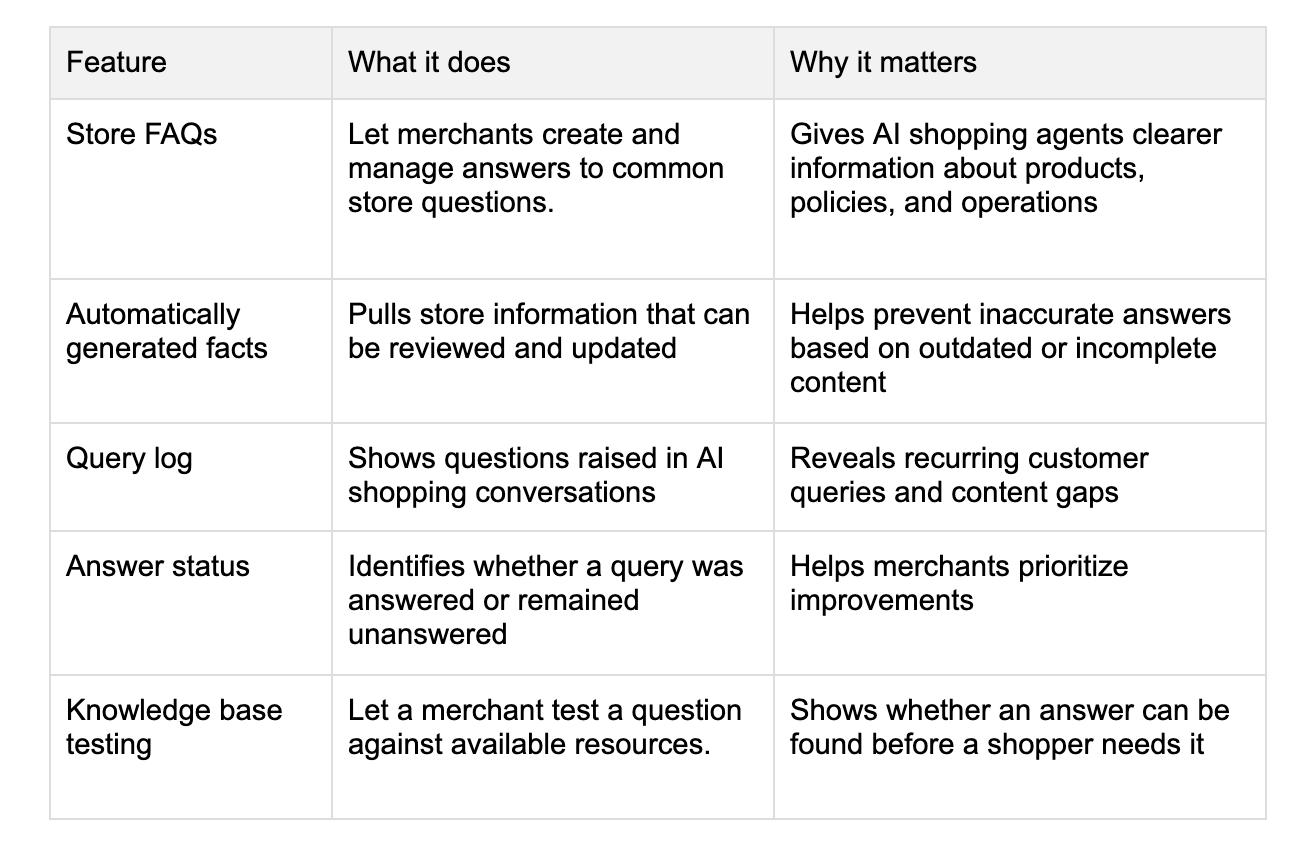
According to Shopify, the app’s query log can show the customer question, the source that matched the question, the AI shopping agent involved, and the date the query was made. Merchants can also filter questions by answered and unanswered status.
How the App Works
After an eligible merchant installs the app from the Shopify App Store, it becomes available in the Shopify admin. The store team can then access the app, review suggested content, and make edits from within their Shopify account.
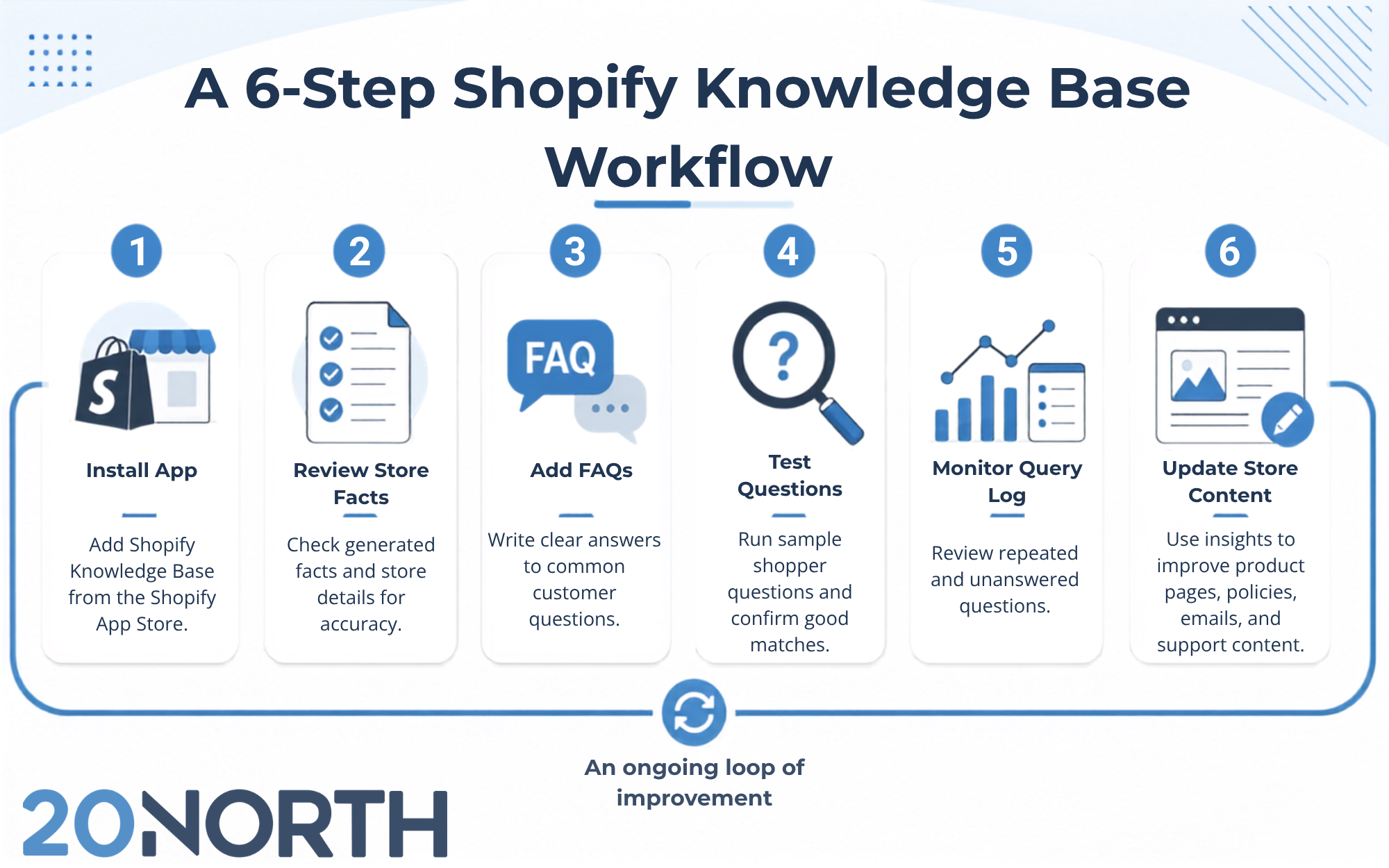
The workflow is relatively straightforward:
- Install the Shopify Knowledge Base app.
- Review the automatically generated store facts and FAQs.
- Edit any information that is incomplete, unclear, or outdated.
- Add high-intent questions that customers commonly ask.
- Test questions to see whether the app finds a relevant answer.
- Monitor the query log for unanswered questions and recurring patterns.
- Use those insights to improve store content, customer service resources, and marketing campaigns.
Shopify can generate some FAQ content based on store data, but merchants retain control over the answers. If a generated answer is inaccurate or lacks context, the merchant can override it with a custom answer. Shopify also allows users to revert an overridden answer back to its original source if needed.
Why Shopify Stores Should Use It
Many e-commerce brands focus heavily on driving traffic but give less attention to the unanswered questions that keep visitors from purchasing. A shopper may reach a product page, compare options, and leave because they cannot quickly verify sizing, compatibility, ingredients, delivery timing, or return terms. The Shopify Knowledge Base app gives merchants another data source for understanding those moments of friction.
Find Content Gaps Before They Cost Sales
The app’s query log can reveal questions AI shopping agents could not answer. Shopify identifies these as unanswered queries, meaning no available information matched the customer’s request.
An unanswered question may point to a gap in one or more areas:
- Missing information on a product page
- Unclear shipping or return policy language
- Incomplete product specifications
- Missing comparison content
- A confusing checkout or customer-account experience
- Limited support documentation
- Weak messaging on a paid-media landing page
- Missing educational content for a sales channel
For example, a customer could ask, “Will this product work for someone with sensitive skin?” If the AI shopping assistant cannot find an answer, the issue may not be limited to the knowledge base. The product page may need ingredient details, guidance on intended use, or language directing shoppers to consult a professional where appropriate.
Likewise, a question such as “When will my Shopify order ship?” may indicate that processing and shipping timelines are difficult to find. The answer should be consistent across your policy page, checkout messaging, order confirmation emails, and customer service materials.
Improve the Accuracy of AI Answers
Accurate answers protect the customer experience and reduce avoidable support contacts. If AI shopping agents repeat outdated policy language or incomplete product information, a merchant can lose trust before a shopper reaches the checkout page.
Review each generated FAQ carefully, especially answers involving:
- Shipping and delivery expectations
- Return policy restrictions
- Exchanges and cancellations
- Subscription terms
- Product availability
- Product fit and sizing
- Materials, ingredients, and care instructions
- Warranty information
- Product compatibility
International shipping
Use concise language. Shopify recommends short, direct answers when adding FAQs manually. If the answer varies by product, explain the condition clearly and direct shoppers to the applicable product page or policy page.
Support Customer Service Teams
The app can also help keep customer service teams more informed. While it may not replace an AI chatbot or live chat tool, the questions it captures can help support teams recognize recurring issues before they become costly.
This creates a useful feedback loop:
- An AI shopping assistant receives a customer query.
- The Shopify Knowledge Base app records whether the query received an answer.
- The support team reviews patterns in the data.
- The marketing, content, and web teams improve the relevant content.
- Future shoppers get clearer answers before contacting support.
How to Set Up Shopify Knowledge Base
A thoughtful setup is more valuable than a large collection of generic FAQs. Start with the issues most likely to affect purchase decisions, customer confidence, or support volume.
Review Existing Store Information
Before creating new answers, audit the information already present in the Shopify store. Review your:
- Product titles and descriptions
- Product specifications
- Shipping and delivery policy
- Return policy
- Refund and exchange rules
- Customer-account instructions
- Order-tracking process
- Subscription details
- Warranty information
- Brand story and store policies
This is particularly important for brands with frequent catalog updates, seasonal products, limited inventory, or multiple sales channels. AI-generated answers can only be as reliable as the information available across your store.
Add High-Intent FAQs
Prioritize questions that reduce hesitation near the point of purchase. Start with the most common customer queries your support team already receives.
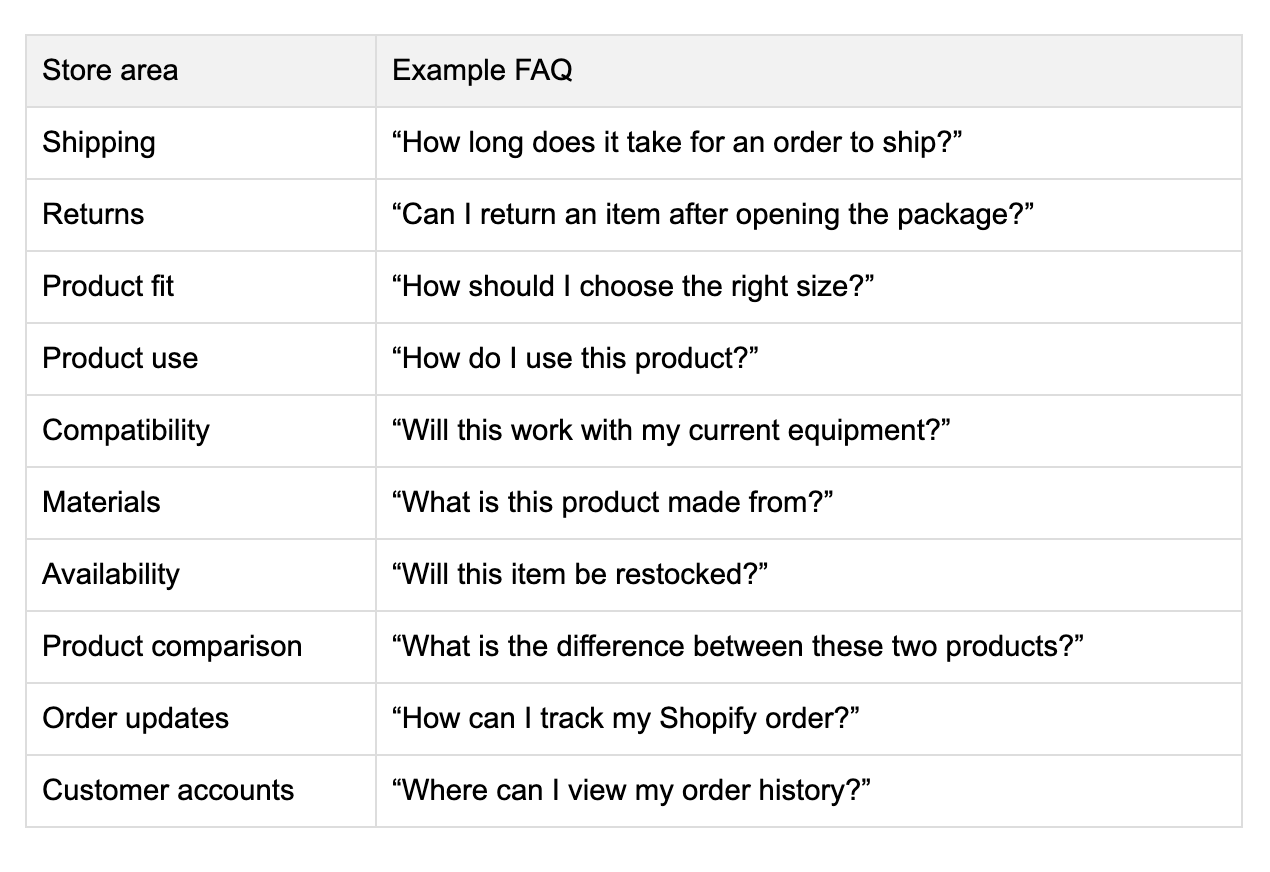
Avoid vague answers such as “Shipping varies” or “Contact us for details.” Instead, explain the expected process, state any exceptions, and send customers to the correct page when additional details are necessary.
Test Before You Rely on It
Shopify includes a testing tool that lets merchants submit a question and see if the app finds a matching answer. If no answer is matched, Shopify records that question as unanswered.
Do not assume the app will provide real-time inventory, delivery, or order-status information unless that functionality is confirmed for your store setup. Instead, test high-value questions before major product launches, paid advertising campaigns, and seasonal sales periods. Use clear wording that matches the actual data source and policy behind the answer.
Turn Query Data Into Better Store Content
The Shopify Knowledge Base app is most valuable when it informs decisions beyond the app itself. Query data can guide product content, customer support documentation, email marketing, paid media, and SEO.
Improve Product Pages
Product pages should answer the questions that determine if someone adds an item to the cart. When a query appears repeatedly, identify the page closest to the buying decision and add the answer there.
The goal is to provide the information before a customer needs to ask. This improves the experience for site visitors, customer service teams, and AI shopping agents.
Use Insights for Search Engine Optimization
Customer questions are useful SEO research because they often reflect long-tail search behavior. When shoppers ask clear, recurring questions, those same questions may appear in search engine queries.
Use the Shopify Knowledge Base query log as one data source alongside Google Search Console, keyword research tools, internal site-search data, customer emails, and sales conversations.
The strongest opportunities often involve:
- Product comparisons
- Product use cases
- Material or ingredient questions
- Sizing and fit guidance
- Shipping and return expectations
- Buying guides
- Category education
- Product care and maintenance
For example, if shoppers repeatedly ask about the difference between two products, update both product pages and consider publishing a comparison guide. Link the guide to related collection pages and product pages so customers and search engines can understand the relationship between the products.
Strengthen Email Campaigns
Email marketing can answer questions before they turn into customer service tickets. If the knowledge base reveals confusion about product use, fit, delivery, or returns, build those answers into relevant automated flows.
Examples include:
- Welcome emails that explain product categories and bestsellers
- Browse-abandonment messages that answer common product questions
- Cart-abandonment emails that clarify shipping or return information
- Post-purchase emails with product-use instructions
- Customer-account emails that explain order tracking and support options
- Replenishment emails that address product care or reorder timing
Email marketing services help Shopify brands develop email strategies that support conversion, retention, and customer education.
Improve Paid Media and Landing Pages
A custom pixel can help brands understand how visitors interact with paid-media landing pages and track key conversion events. However, tracking data alone does not explain why a shopper hesitated.
The Shopify Knowledge Base app can add useful qualitative context. If paid visitors frequently ask questions about product fit, shipping, or returns, review whether the landing page answers those questions clearly.
This is especially helpful when running campaigns for:
- New product launches
- Seasonal collections
- Product bundles
- High-consideration products
- Subscription offers
- First-purchase promotions
- Brand-specific sales channels
Paid media services combine campaign strategy, creative, tracking, and landing-page improvement to help e-commerce businesses get more value from ad spend.
Build Better Shopify Integrations
The Shopify Knowledge Base app can fit into a broader Shopify integration strategy. A growing e-commerce business may use Shopify alongside Klaviyo, analytics tools, customer support software, loyalty platforms, reviews apps, subscription tools, and inventory systems.
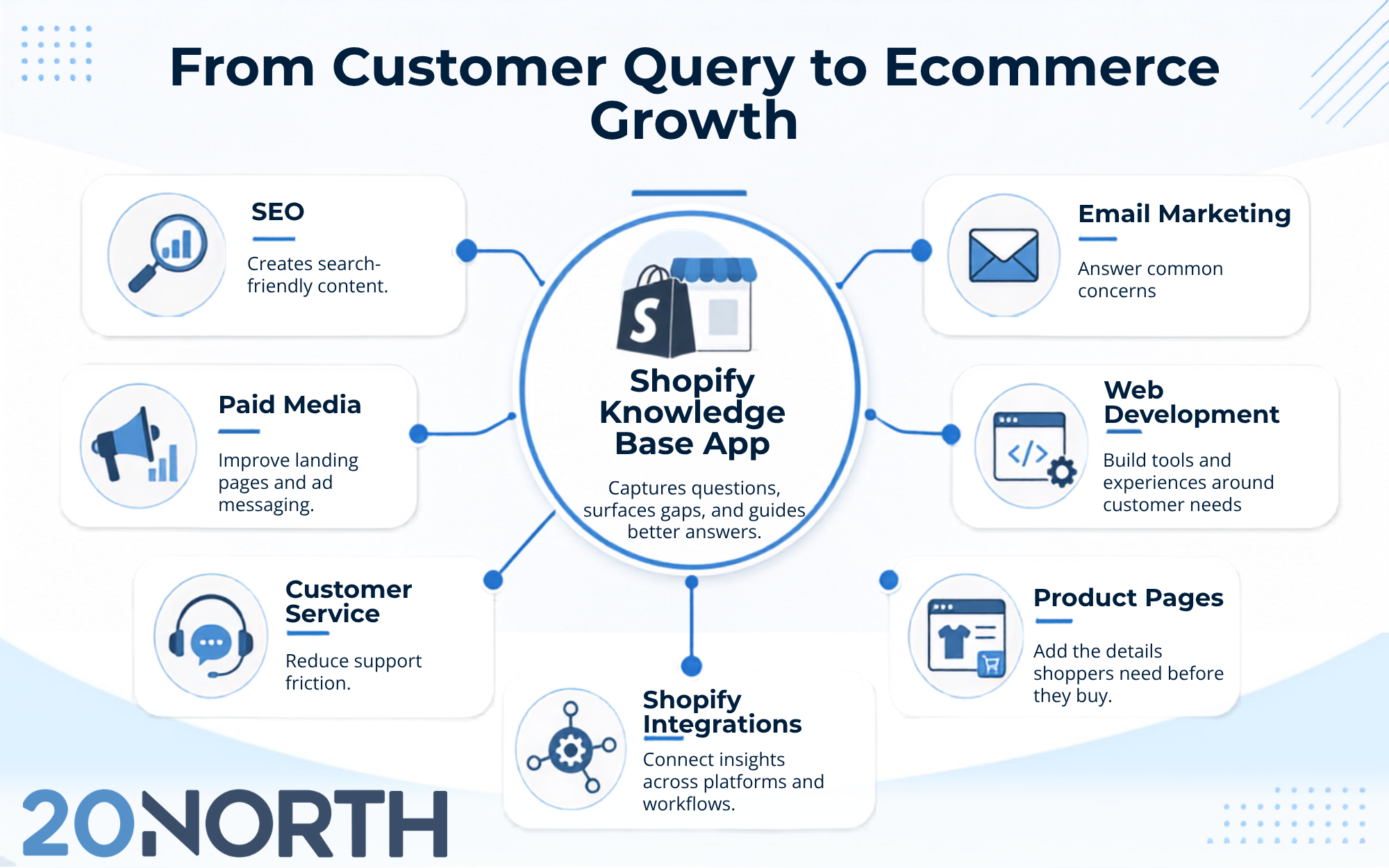
The knowledge base does not replace these systems, but it can help teams identify where information is disconnected. For more specialized workflows, a custom app or custom development project may be appropriate. This could include a product finder, comparison tool, customer portal, order-status experience, or support workflow designed around the needs of a particular Shopify store.
Common Mistakes to Avoid
The Shopify Knowledge Base app can provide valuable customer insight, but it is not a set-it-and-forget-it tool. Avoid these mistakes:
- Automatically generating answers without review
- Treating the app as a replacement for the customer support team
- Writing vague answers in the knowledge base
- Ignoring unanswered customer queries
- Using outdated shipping, return, inventory, or product information
- Creating FAQs without identifying the correct data source
- Overusing technical language customers may not understand
Each answer should reflect your current store policies and product information. Review the knowledge base after major catalog changes, policy updates, website redesigns, new integrations, and promotional launches.
Using Shopify Knowledge Base as a Growth Tool
The Shopify Knowledge Base app helps merchants understand what AI shopping agents need to know about their store. It can surface customer questions, show where answers are missing, and give Shopify users more control over the information used in AI-assisted shopping experiences.
As a Shopify Premier Partner, 20North helps e-commerce brands connect Shopify SEO, email marketing, paid media, and web development into a data-driven growth strategy. If your Shopify store has recurring customer questions, unclear product content, or underperforming landing pages, we are here to help. Contact 20North today for a free audit of the gaps affecting conversion and retention and a plan to support your company’s growth.
.png)
.png)
.png)