
.png)
The Short Answer: To fix keyword cannibalization, find the pages competing for the same search query, pick one preferred page, then merge, or re-optimize the others so each web page serves its own search intent. Finish by updating your internal links so Google gets one clear signal about which page to rank.
Keyword cannibalization is one of the most common problems we uncover during an SEO audit, and it usually builds up quietly. A company publishes a blog post, then a landing page, then a guide on the same topic a year later, and suddenly three pages are fighting for the same spot in the search results. In this guide, we cover what keyword cannibalization is, why it holds back your search engine rankings, how to spot it, and the steps to fix it.
What Is Keyword Cannibalization?
Keyword cannibalization happens when multiple pages on your website target the same keyword and match the same search intent. Instead of one strong page ranking, a search engine sees several similar pages and has to guess which one deserves the spot. Google often rotates between them, and none of them ranks as well as one strong page would.
Not every overlap is a problem. Two pages can share a specific keyword and still serve a different intent. A service page for technical SEO and a blog post explaining what technical SEO means can rank for related terms without trouble. The cannibalization issue shows up when both pages answer the same question for the same searcher. That is why understanding short-tail vs. long-tail keywords and the intent behind them matters before you publish.
Why Keyword Cannibalization Hurts Your SEO Efforts
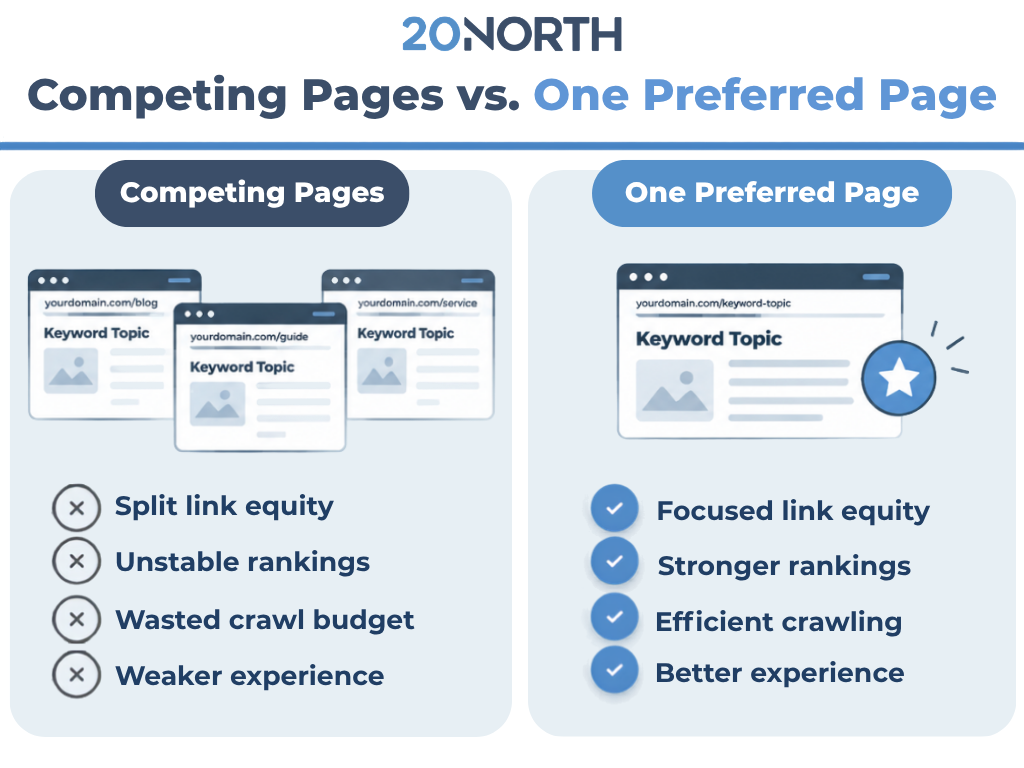
When pages across your site target the same term, they split the value that should be flowing to one authoritative page. Here is what that internal competition costs you:
- Split link equity: Backlinks and internal links get spread across several URLs instead of building up one page. Each page ends up weaker than a single consolidated page would be.
- Unstable search rankings: Google may swap which URL shows for a search query week over week. Rankings bounce around, and none of the pages hold a top position for long.
- Wasted crawl budget: Search engines spend time crawling similar content that adds nothing new.
- Weaker user experience: Visitors land on an older or thinner page when a better one exists, hurting engagement and conversions.
The stakes are high. An Ahrefs study of roughly 14 billion pages found that 96.55% of content gets no traffic from Google. Competing pages only lower your chances of being in the small share of content that earns traffic.
How to Find Keyword Cannibalization Issues
You cannot fix a keyword cannibalization issue until you know where it lives. These three methods cover most sites.
- Check Google Search Console
Google Search Console is the fastest free place to start. Open the Performance report, filter by a query you care about, then click the Pages tab. If two or more URLs earn impressions for the same query, you likely have similar pages competing. Watch for URLs that trade clicks back and forth over time.
- Run a Google Search
Type “site:yourdomain.com "target keyword" into Google search. The search engine results will list the pages on your domain that mention the term. This quick check often surfaces an old blog post or forgotten landing page you did not realize was still indexed.
- Use SEO Tools and a Rank Tracker
Most SEO tools flag URLs that rank for the same keyword. A rank tracker adds history, showing when one URL replaces another in the results. That swapping pattern is one of the clearest signs of an SEO keyword cannibalization problem.
How to Fix Keyword Cannibalization
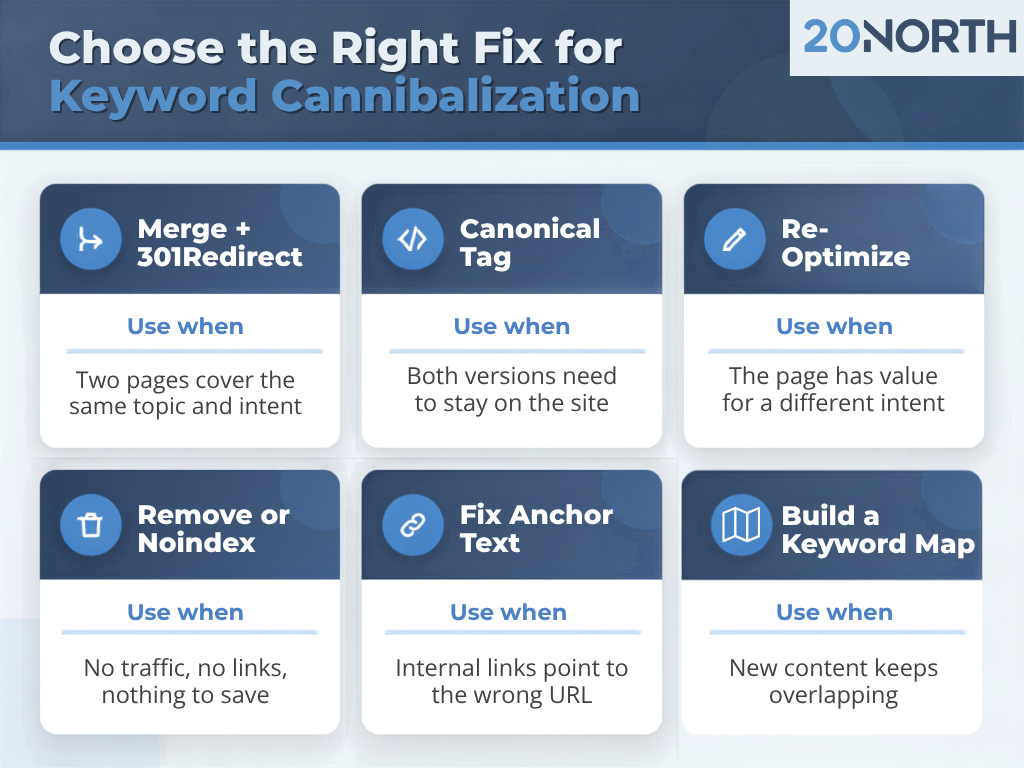
Once you have a list of competing pages, work through them one group at a time. The right fix depends on how much each page overlaps and how much value it carries.
- Confirm the Search Intent
Search the keyword and study the top results. Are they guides, product pages, or service pages? That tells you what type of page Google wants for the query. If your competing pages serve the same intent, one needs to go or change. If they serve a different search intent, you may only need clearer targeting.
- Choose Your Preferred Page
Pick the page that should rank. Compare traffic, conversions, backlinks, and content quality across each URL. The strongest performer usually becomes your preferred page, even if it is not the newest.
- Merge Similar Content and Redirect
When two pages cover the same topic, combine the best parts into a single page. Move any unique sections, stats, and examples into the preferred page, then 301 redirect the old URL to it. This consolidates link equity and gives Google one clear answer. Merging is often the strongest fix for content cannibalization.
- Add a Canonical Tag
Sometimes both pages need to stay live, like product variants or filtered collection pages. In those cases, add a canonical tag on the duplicate that points to the preferred page. Google's guide on consolidating duplicate URLs explains how canonical signals work.
- Re-Optimize for a Different Intent
Give a competing page a new job. Rework its title, headings, and copy around similar keywords that match a different intent. For example, a guide on how to fix keyword cannibalization and a post on what causes content cannibalization can both earn traffic once each targets its own specific keyword. Our on-page SEO services handle this kind of retargeting across large sites.
- Update Internal Linking and Anchor Text
Internal links tell search engines which page matters most. Point every relevant internal link for the target keyword to your preferred page, and use descriptive anchor text that matches it. Change any links that send the same anchor text to a different page. External links you control, like directory listings or partner profiles, should point to the preferred URL.
- Remove or Noindex Thin Pages
Some pages may not be worth saving. Delete them and redirect each one to the closest of your relevant pages, or add a noindex tag if the page still serves visitors. Fewer, stronger pages make it easier for Google to understand your site.
How to Prevent Keyword Cannibalization Going Forward
Fixing the problem helps, but a clear content strategy keeps it from coming back. A few simple checks keep your pages from competing again:
- Build a keyword map: Assign one primary keyword to one URL before anyone writes. Our keyword research services start with this step.
- Check before you publish: Search your own site for the target keyword before creating a new blog post or landing page.
- Update instead of duplicating: Refresh an existing page when a topic needs new information rather than publishing a second version.
- Audit on a schedule: Review Search Console queries every quarter to catch overlap early.
Build Stronger Search Rankings With 20North
Keyword cannibalization weakens good content by making your own pages compete. Find the overlap, choose a preferred page, and then merge, or re-optimize the rest. Tie it together with focused internal linking, and search engines will know exactly which page to rank.
At 20North, we help growing businesses turn scattered content into focused pages that earn traffic and leads. Our team covers SEO, paid advertising, email marketing, and web development, and we include a free audit that shows where your pages compete with each other and which fixes will move rankings first.
Explore our SEO services and contact us to get started.
.png)
.png)
.png)