
.png)
The Short Answer: You control AI crawlers by adding a user-agent group for each AI bot to your robots.txt file and pairing it with allow or disallow rules. Most major AI companies publish separate user agent tokens for AI training and AI search, so a site owner can block training data collection and still appear in AI-generated answers.
AI crawlers now make up a share of the requests hitting your web server.https://blog.cloudflare.com/from-googlebot-to-gptbot-whos-crawling-your-site-in-2025/, while OpenAI's GPTBot grew 305% over the same period. Some of those visits can help your brand show up in AI search. Others collect web content to train large language models and send little traffic back. In this blog post, we explain how AI crawlers work, which user agent tokens matter, and how to write robots.txt rules that match your goals.
What Are AI Crawlers?
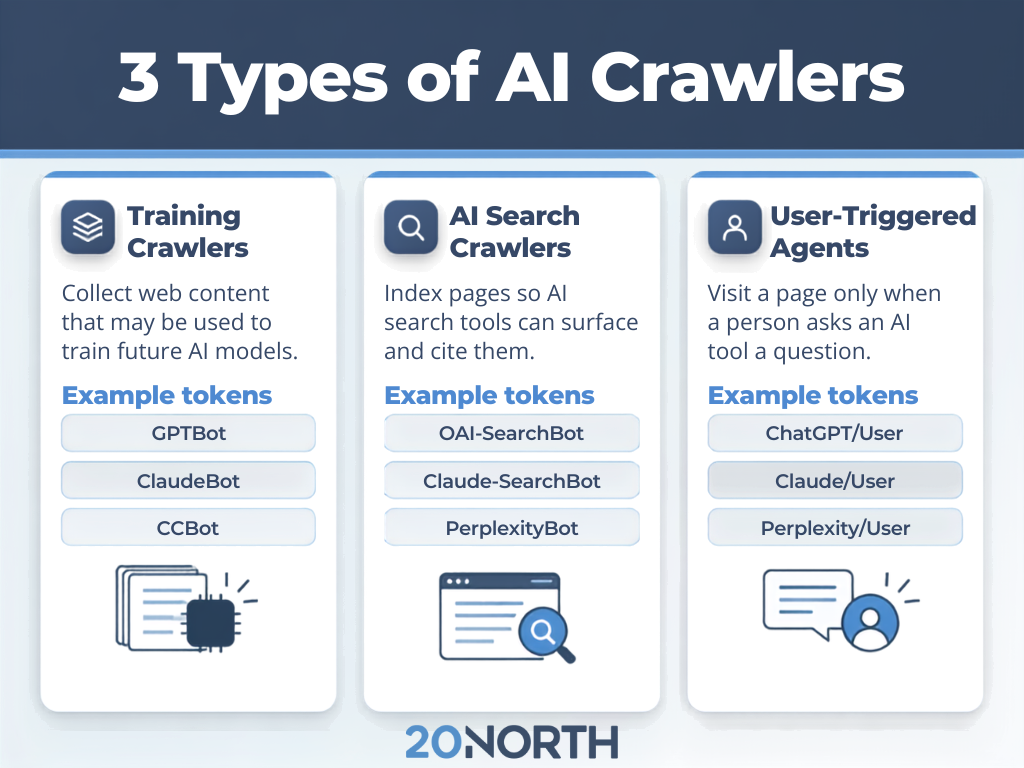
An AI crawler is an automated bot that visits web sites to collect content for artificial intelligence systems. Traditional web crawlers like Googlebot index pages for search results, while many AI crawlers also gather training data for generative AI models.
Training Crawlers
Training crawlers collect web content that may be used to build and improve AI models. GPTBot, ClaudeBot, and Common Crawl's CCBot belong to this group. Blocking them signals that your future content should stay out of AI training datasets.
AI Search Crawlers
Search-focused bots, such as OAI-SearchBot and Claude-SearchBot, index pages so AI search features can surface and cite them. Blocking these bots can remove your pages from AI-generated answers, even when those pages still rank in Google Search.
User-Triggered Agents
ChatGPT-User and Claude-User only visit a page after a person asks an AI tool a question (e.g., a request to summarize a product page or check current events). OpenAI notes that robots.txt rules may not apply to these user requests, since a person started the visit. This category grows as more shoppers hand tasks to an AI agent.
How robots.txt Works With AI Crawlers
The robots.txt file lives at the root of your domain and follows the Robots Exclusion Protocol, which the IETF formalized as RFC 9309. Each group in the file starts with a User-agent line that names a crawler, followed by rules that allow or disallow specific paths.
A bot reads the file, finds the group that matches its user agent token, and follows those rules. If no group matches, it falls back to the wildcard group marked with an asterisk.
The user agent token in robots.txt is not always the same as the full user agent string in your server logs. Google-Extended is a good example. It has no separate HTTP user agent string and works as a control token for Gemini training and grounding. Blocking it does not affect a site's inclusion or ranking in Google Search.
AI Crawler User Agent Tokens to Know
Use the exact tokens each company publishes. These are the ones our SEO team sees most often in client log files:
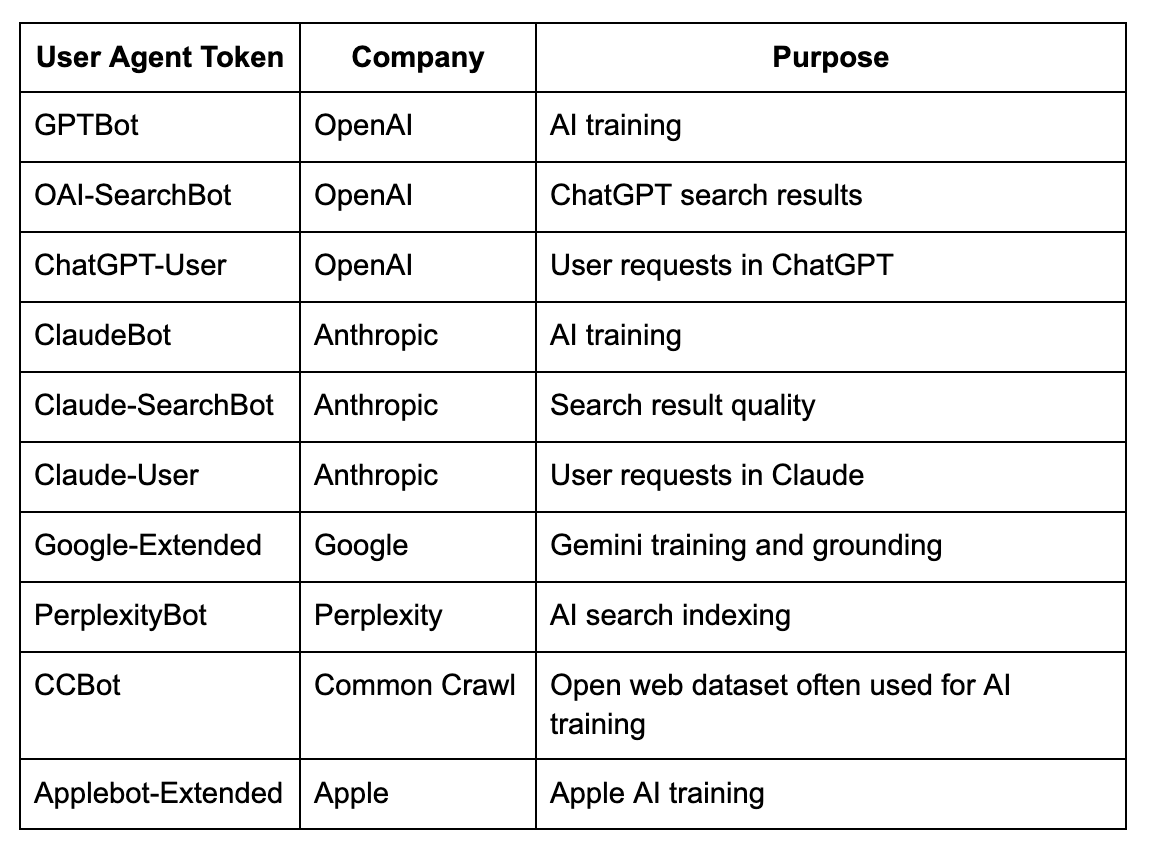
OpenAI lists its bots and published IP ranges on its crawler overview page, and Anthropic explains its three bots in its help center. Check both pages every few months for new bots.
How to Control AI Crawlers in robots.txt
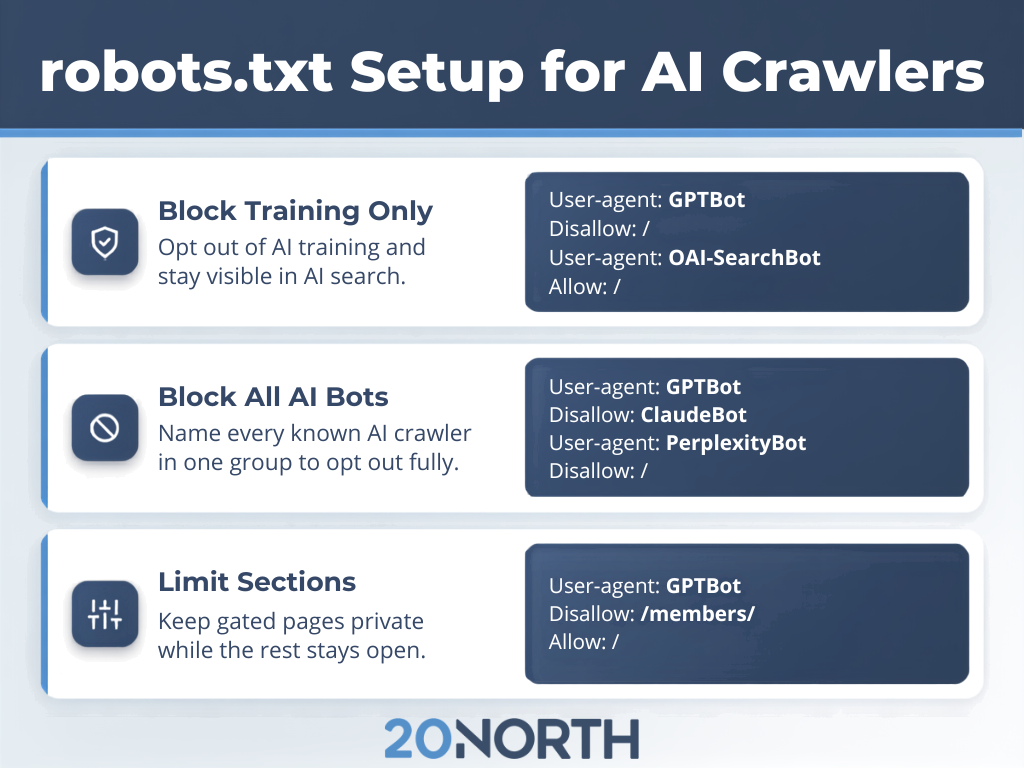
Block AI Training and Keep AI Search
This is the most common choice for brands that want AI search visibility without supplying AI training content. OpenAI states that each of its settings is independent, so a site can allow OAI-SearchBot while disallowing GPTBot.
Here is what that split looks like in practice. The first three groups name the training bots and shut them out of the whole site, and the last two name the search bots and let them through.
User-agent: GPTBot
Disallow: /
User-agent: ClaudeBot
Disallow: /
User-agent: Google-Extended
Disallow: /
User-agent: OAI-SearchBot
Allow: /
User-agent: Claude-SearchBot
Allow: /
With these rules in place, your pages stay out of future model training while ChatGPT and Claude can still crawl, index, and cite them in AI-generated answers.
Block All Known AI Crawlers
Some site owners, especially publishers and visual artists, prefer to opt out entirely. List every AI bot by name and give the group a sitewide Disallow rule. Avoid using the wildcard group for this, since it would also block Googlebot and other search engine crawlers.
Here is what a full opt-out looks like. Every named bot is stacked into one group, and the single Disallow rule at the bottom applies to all of them.
User-agent: GPTBot
User-agent: OAI-SearchBot
User-agent: ClaudeBot
User-agent: Claude-SearchBot
User-agent: PerplexityBot
User-agent: Google-Extended
User-agent: CCBot
Disallow: /
This keeps your content out of AI training and AI-generated answers while Googlebot and other traditional search engine crawlers still reach your pages normally.
Limit Access to Specific Sections
You can also give an AI bot partial access. This works well for sites that want service and product pages cited but prefer to keep gated resources, member areas, or internal search pages private.
Here is what partial access looks like. The two Disallow lines fence off the directories you want kept private, and the Allow rule underneath leaves the rest of the site open.
User-agent: GPTBot
Disallow: /resources/
Disallow: /members/
Allow: /
GPTBot can still crawl and learn from your public pages, while anything under those two paths stays out of reach.
After you publish changes, confirm the file loads correctly and review your server logs over the next few weeks. OpenAI says its systems can take about 24 hours to adjust after a robots.txt update. An SEO audit can also catch rules that block pages you want found.
Where robots.txt Falls Short
Reputable AI companies say they honor robots.txt as a voluntary standard, but AI scrapers with no public documentation can ignore it. In 2025, Cloudflare reported observing Perplexity crawlers that changed user agents and rotated IP addresses after being blocked. For stronger protection, pair your robots.txt file with server-level controls.
These four controls sit at the server level, where a crawler has to obey them:
- WAF configuration: A web application firewall can block or challenge requests based on user agent string, network, or behavior.
- IP verification: Compare requests against the IP ranges each company publishes to catch bots that spoof a known name. Google warns that user agent strings can be spoofed.
- Rate limiting: Cap how many requests a single bot can make per minute to protect your web server during heavy crawls.
- Log monitoring: Track AI bot traffic by user agent to spot new crawlers early.
These controls usually require developer access, which is where a professional web development team steps in. 20North’s web development team handles crawler rules, firewall configuration, and log review together so the two layers agree with each other.
Should You Block AI Crawlers?
Blocking is common among news sites. The Reuters Institute found that 48% of top news websites across ten countries were blocking OpenAI's crawlers by the end of 2023, and the rate reached 79% in the U.S. The New York Times was among the major publishers that blocked GPTBot.
For growing businesses chasing traffic, leads, and sales, AI search is another place customers can find you. Blocking search bots can remove your pages from AI-generated answers, and blocking Googlebot to avoid AI features would also remove you from Google Search. Our guides on Google AI Mode and how AI is changing Google Search explain why that visibility matters. If you want to know where your site currently stands, our free AEO audit shows which AI bots reach your pages and where you are showing up in AI-generated answers.
A balanced setup often works best. Block training bots if content ownership is a concern; keep search bots open, and track your brand's visibility in AI search to measure the impact. To protect premium assets, a potential solution is placing them behind a login while service pages and blog content stay open.
Take Control of Your AI Strategy With 20North
AI crawlers are now a permanent part of web crawling. A clear robots.txt file lets you decide which AI systems can use your content for training, cite it in AI search, or stay off your site entirely. Pair those rules with server-level controls and revisit them as new bots appear.
20North is an Atlanta-based digital marketing agency working with growing businesses across e-commerce, home services, manufacturing, and professional services. Our team covers technical SEO and AI SEO, Google and Meta Ads, email marketing, and web development, so the work that gets you found also converts once visitors land.
Want to know what your current robots.txt file allows? Get in touch or start with a free audit.
.png)
.png)
.png)