
.png)
The Short Answer: Google AI Mode is a tab inside Google Search that gives you a full AI-generated answer instead of a list of blue links, and you can ask follow-up questions to keep digging. It runs on a custom version of Google's Gemini model and pulls live web content to respond to your search queries.
Google AI Mode is one of the bigger changes to how people use a search engine in years. Instead of scanning ten links, you type a question and get an AI summary built around it. You can then ask follow-up questions in the same thread without starting over. For anyone who runs a website, this changes how you get found on Google. In this guide, we cover what Google's AI Mode is, how it works, how it differs from AI Overviews and traditional search, and the steps you can take to show up inside it.
At a Glance
- What it is: a dedicated AI Mode tab in Google Search that returns a conversational, AI-powered response.
- What powers it: a custom version of Google's Gemini, the same family behind the Gemini app.
- Where it lives: it started in the U.S. and sits alongside normal search results.
- Why it matters: your content can be cited inside the AI answer, so optimizing for it protects your organic search traffic.
What Is Google AI Mode?
Google AI Mode is a search feature that answers your question with a single AI-generated answer, then lets you continue the conversation. Google introduced it in 2025, first as an experiment and later as an AI Mode tab available to users across the U.S. You reach it from the search bar or a new tab next to the normal results. You can read the official announcement from Google for the background.
Think of it as a mix between the Gemini app and the Google search results you already know. It handles your toughest questions, the kind that used to take three or four separate searches. Ask it to compare products, plan a trip, or break down a topic, and it builds one response with links to sources. This is the tech giant leaning further into generative AI inside its main product.
How Google AI Mode Works
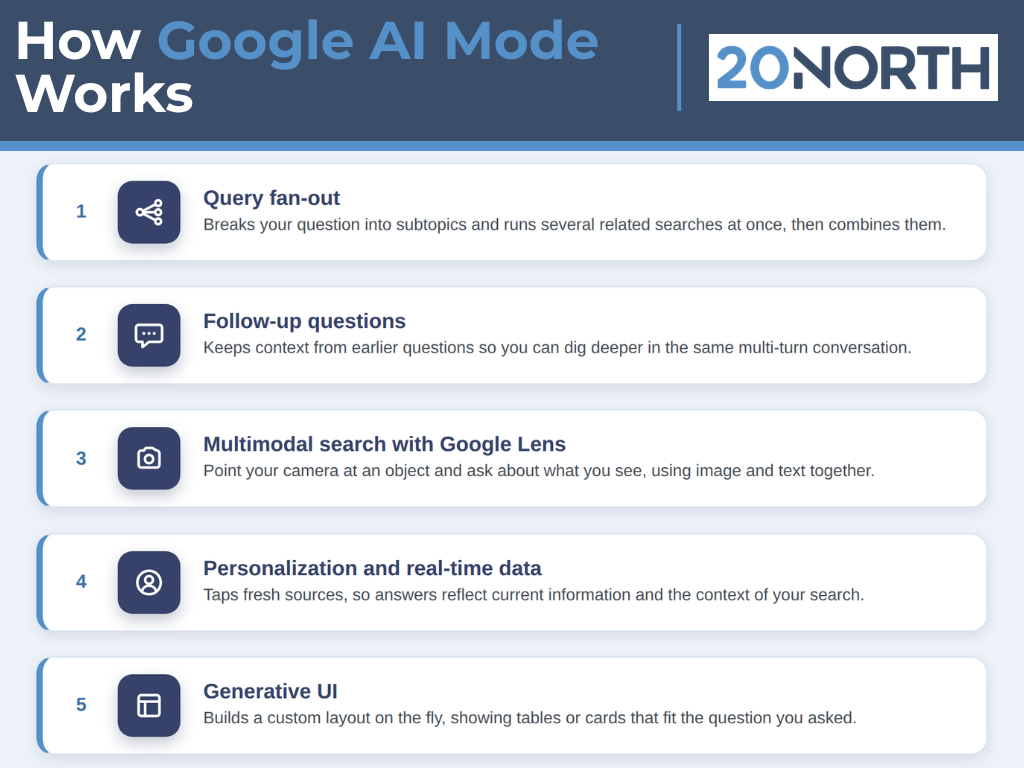
AI Mode does more than paste an AI summary on top of the page. It runs its own process to gather information and shape an AI-powered response. Here is what happens behind the scenes.
Query Fan-Out
When you type a query, AI Mode does not run one search. It uses a "query fan-out" technique. It breaks your question into smaller subtopics, runs several related searches at once, and pulls from Google's search index plus real time sources like shopping data and the Knowledge Graph. It then combines those results into one answer. This is why AI Mode can go deeper than a single traditional search.
Follow-Up Questions and Multi-Turn Conversation
After the first answer, you can ask follow-up questions in the same thread. This multi-turn conversation lets you refine your search journey step by step. You might ask a broad question, then narrow it down, then compare two options. The AI assistant keeps the context from your earlier questions, so you do not repeat yourself.
Multimodal Search With Google Lens
AI Mode is multimodal, which means it accepts more than typed text. You can use Google Lens to search with your camera, point it at an object, and ask about what you see. The AI-generated answer can respond to an image and text together. That opens the search box to questions that are hard to describe in words.
Personalization and Real-Time Data
AI Mode can factor in context to give more useful results. Because it taps real time sources, the answer reflects fresh information rather than a static page. Two people can type the same words and get different answers based on context and location. This is a core principle of how Google's AI is built: it aims to give each user the most relevant response for their context.
Generative UI
For some searches, AI Mode builds a custom layout on the fly. This generative UI implementation can show tables, product cards, or step-by-step formats that fit your question. Instead of the same template every time, the page shape adapts to what you asked.
Pro Tip: Test your own brand and product searches in the AI Mode tab. Read the AI-generated answer, note which sites it cites, and check if your pages show up. That quick audit tells you where you stand today.
Why Google AI Mode Matters for Your Website
When Google answers a question directly, some users never click through to a website. That worries a lot of business owners, but AI Mode still cites sources and links out, so your pages can appear inside the answer. The goal shifts from ranking a link to becoming the source the AI quotes. This practice is often called generative engine optimization, and it sits right next to your normal SEO work.
The brands that get cited tend to have clear, well-structured content that answers real questions. That is the same foundation good SEO has always rewarded. Our SEO team treats AI Mode as another surface to earn visibility on, building on the same optimization basics you already use to rank.
How to Optimize for Google AI Mode
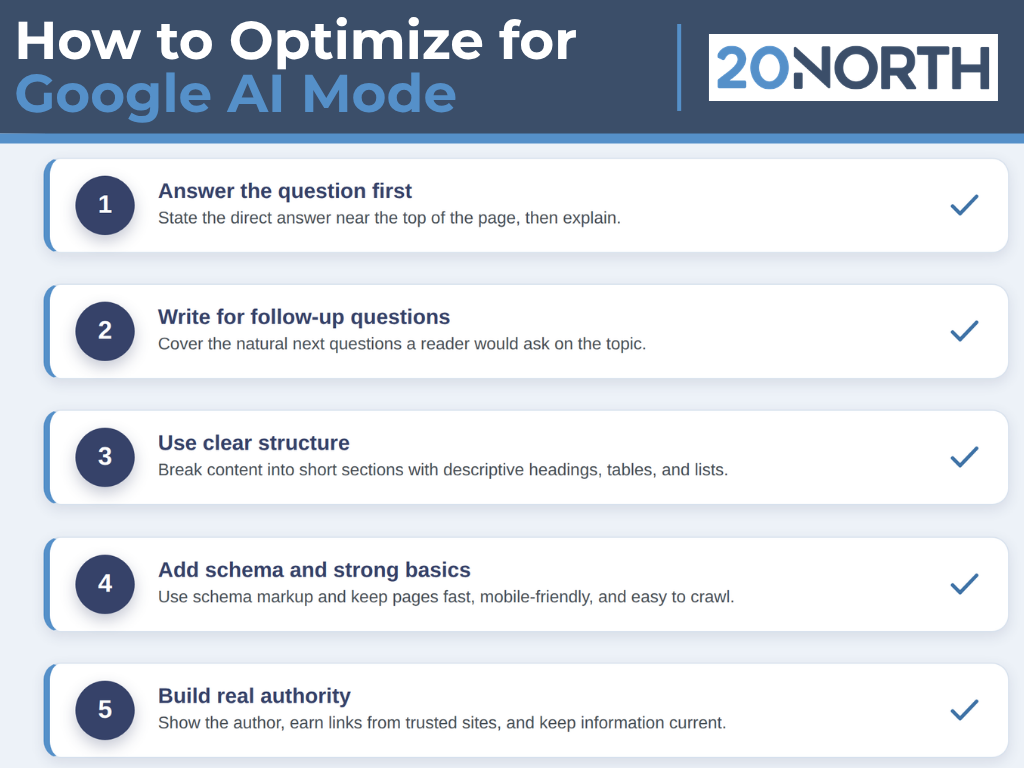
You cannot buy your way into AI Mode, and there is no AI Mode payment option for placement. You earn a spot by being a clear, reliable source. Google's own guidance on its AI features in Search lines up with these steps.
Answer the Question First
Put a direct answer near the top of the page. AI Mode favors content that states the point plainly, then explains. Lead with the takeaway. Save the long backstory for lower on the page.
Write for Follow-Up Questions
Because users ask follow-up questions, cover the natural next questions on the same topic. Group related points so the model can pull a clean, complete answer. Anticipate what someone would ask second and third.
Use Clear Structure
Break content into short sections with descriptive headings. Add tables and lists where they fit. Structured pages are easier for the search engine to read and cite than one long block of text.
Add Schema and Strong Basics
Use schema markup so Google understands your content. Keep pages fast, mobile-friendly, and easy to crawl. These basics still carry weight in both traditional search results and AI search features. Our web development team builds these into the site.
Build Real Authority
Show who wrote the content and why they know the subject. Earn links and mentions from trusted sites. Keep information current. Google's AI leans on signals of trust when it decides which sources to quote.
Want to see where you stand in AI Mode? 20North helps brands earn visibility across Google, AI Overviews, and the AI Mode tab. Talk to our team about a search audit built for how people search now.
Getting Your Site Ready for AI Mode
Google AI Mode is a real shift in how people search. It swaps a page of links for one AI-generated answer, adds follow-up questions, and pulls from real-time sources through Google's Gemini. AI Overviews, AI Mode, and traditional search now sit side by side, and each one is a place your brand can show up. The winners will be sites that answer questions clearly, structure their pages well, and earn trust. That work also helps across regular organic search and even social media, so it pays off in more than one channel.
At 20North, we build search strategies that cover all of it. See our SEO services or reach out to our team to get started.
.png)
.png)
.png)