
How to Migrate Squarespace to Shopify Without Losing Your SEO or Sales

At a Glance: SquareSpace has limitations where Shopify is a better platform for scaling and has many more features and customization options along with their own payment gateways.The migration process involves moving your store data, including products, customer data, order history, URLs, design, and integrations, without disrupting the online store your customers rely on. Done poorly, it can wipe out years of built-up SEO rankings and break your checkout flow. Done correctly, it puts your ecommerce store on a strong platform built for growth. For brands that have hit the ceiling of what Squarespace can do, this is a strategic move, but it requires a clear plan and careful execution.
Why Growing Ecommerce Brands Move from Squarespace to Shopify
Most ecommerce brands start on Squarespace for good reasons. The platform offers clean templates, a simple setup process, and strong content capabilities that make launching an online store fast and accessible. For smaller catalogs and early stage growth, it can feel like the right long term solution.
As stores scale, platform limitations begin to create operational friction. Checkout customization is restricted. Advanced product management often requires manual workarounds. Key ecommerce capabilities like wholesale pricing, B2B ordering workflows, or multi-currency flexibility are difficult to implement. Over time, businesses can find themselves adapting their processes to fit the platform instead of using technology to support growth.
This is typically the point where Shopify becomes the more strategic ecommerce platform. Shopify is built specifically for online retail at scale and provides stronger infrastructure, deeper automation capabilities, and a significantly larger ecosystem of ecommerce focused integrations.
Where Squarespace begins to limit growth
- Limited checkout customization that can create conversion friction
- A smaller app ecosystem compared to the Shopify App Store
- Minimal native support for B2B pricing structures or wholesale workflows
- Less flexibility around payment methods and multi currency selling
- Advanced ecommerce functionality that requires workarounds or cannot be implemented
What Shopify enables instead
- Native ecommerce infrastructure designed for high growth retail brands
- Shopify Payments with accelerated checkout options like Shop Pay
- Built in sales channel integrations across social platforms and marketplaces
- Advanced automation, wholesale functionality, and B2B features on Shopify Plus
- Access to thousands of specialized third party apps for merchandising, fulfillment, and marketing
Migrating platforms introduces real risk if executed without a clear plan. Organic search equity, customer familiarity, and conversion performance can all be disrupted during the transition. Understanding how the migration process works and where ecommerce businesses most commonly encountered issues is essential to protecting both SEO rankings and revenue.
Squarespace vs. Shopify for Ecommerce

What the Migration Process Actually Involves
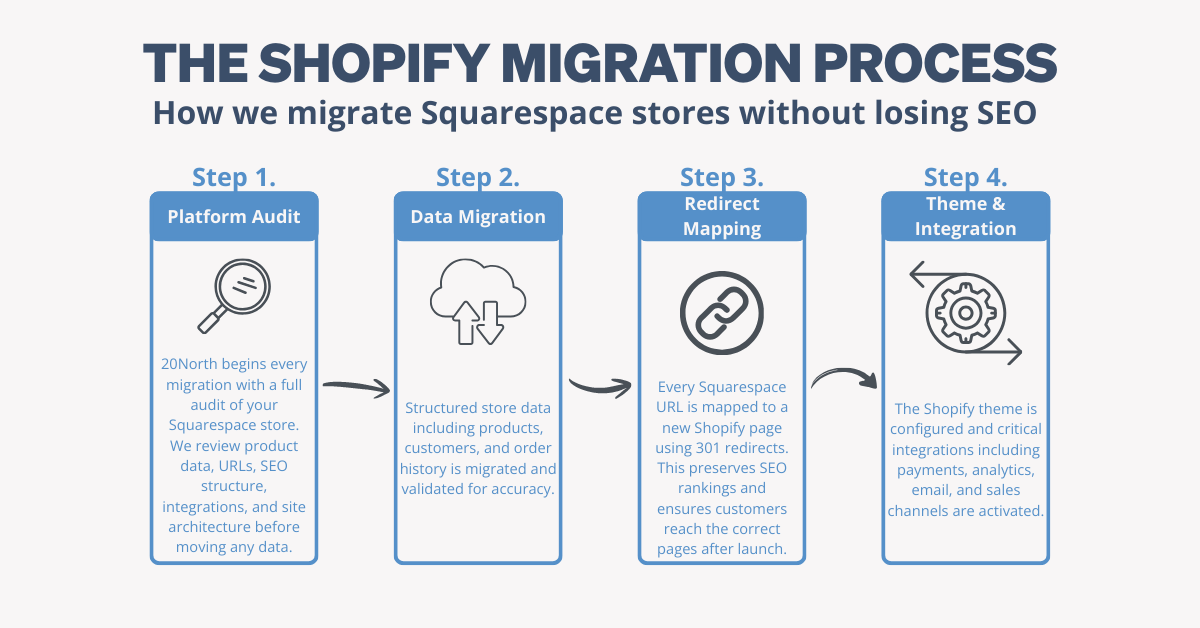
Migrating Squarespace to Shopify is not a copy and paste exercise. Every component of the store must be evaluated, migrated, validated, and tested before launch. A structured migration process ensures store data integrity, preserves search performance, and protects the customer experience during transition.
Audit of Existing Store Structure
At 20North, we start every migration with a full platform audit, reviewing your existing Squarespace store's structure, integrations, and store data before a single file is moved. The process begins by exporting structured store data from Squarespace and importing it into the new Shopify environment.
Data Migration
The migration process covers products, descriptions, images, variants, pricing, SKUs, customer data, order history, and blog posts. Product data usually migrates cleanly if structured consistently. Note that Squarespace caps exports at 2,000 products, so larger catalogs require manual handling beyond that limit. Digital products and gift cards are not included in the export file and must be added manually after migration.
After importing, review the import summary page in your Shopify admin to check for errors and flag any store data that failed to transfer. Customer data and order history require extra care since Squarespace does not always export in formats that map directly to Shopify's data structure. Manual cleanup is often required, and catching issues here before launch is far easier than fixing them after the fact.
Design and Theme Setup
Your Squarespace design does not transfer to Shopify. Your new Shopify store needs to be built on a Shopify theme, which requires intentional setup. The Shopify theme store offers both free and paid options, and best practices include prioritizing mobile-first layouts and fast load times, both of which directly impact user experience and search engine optimization. For advanced customization, Shopify supports liquid code, allowing developers to go beyond standard theme options. A Shopify expert adds value here by configuring the theme precisely and building functionality the theme does not provide natively.
App and Integrations
Most Squarespace stores rely on third party apps and tools for email marketing, inventory, shipping, and analytics. None of these reconnect automatically when you move platforms. Each integration needs to be evaluated against what the Shopify App Store offers, configured, and tested before launch. Shopify seamlessly integrates with major sales channels and marketing tools, expanding your reach well beyond what your existing Squarespace store supports.
Payment and Checkout Configuration
Enable your chosen payment gateways and consider adding digital wallets like Apple Pay and Google Pay for more flexible payment options. Test the full checkout flow including discount codes and gift cards. Account for any subscriptions or saved payment methods that do not transfer automatically from your Squarespace account.
Shopify Site Launch
Final launch preparation includes validating data accuracy, confirming theme responsiveness, testing integrations, and ensuring payment processing operates correctly. Launching only after full customer journey testing reduces the risk of conversion disruption and operational errors.
URL Redirects for URLs That Have Changed
Squarespace and Shopify use different URL structures. Product pages that live at /shop/product-name on your Squarespace store default to /products/product-name on Shopify. Your Squarespace domain will require careful handling during cutover. You will need to unlock your existing domain, obtain the authorization code from your Squarespace account, and update your DNS settings to point to Shopify's servers to avoid downtime and keep your customers connected to your new Shopify store.
Every old URL needs to map to a new one with a 301 redirect so SEO value transfers correctly. Without this, every URL change is a broken link to Google and the ranking equity those pages built disappears. This is the single most common place migrations fail.
Ongoing Monitoring and Stabilization
Post launch monitoring ensures the migration performs as expected. Teams should review Shopify admin diagnostics, monitor Google Search Console for crawl errors, and track traffic and conversion performance during the stabilization period. Most well executed migrations reach performance equilibrium within four to eight weeks.
The SEO Risks of Migrating Squarespace to Shopify
Search engine optimization is not a checklist item in a migration. It is where the most damage can happen and where the most care needs to be applied. It is also where 20North's approach is most different from a standard migration. Our team handles every technical SEO element of the transition, from redirect mapping to metadata rebuilding to post-launch monitoring, so your organic performance is protected from day one. If you want to understand how we approach SEO on Shopify more broadly, you can learn more about our Shopify SEO services.
Why URL Changes Put SEO Rankings at Risk
Search engines assign ranking value to specific URLs through backlinks, indexed content, and crawl history. When a URL changes without a redirect, that value disappears. A 301 redirect passes ranking equity from the old URL to the new Shopify page. When missing or incorrect, you are starting from zero on every page that changed. For a Squarespace store that has been building organic traffic for years, the cumulative SEO rankings at risk can be substantial.
Metadata and On-Page SEO Elements
Beyond redirects, the following need to be rebuilt on your new Shopify store: meta titles and descriptions, header tag structure, canonical tags for product variants and filtered collection pages, image alt text, and structured data for products and reviews. None of this transfers automatically in the migration process.
After launch, submit your updated XML sitemap through Google Search Console immediately. Monitor for crawl errors and 404s during the first 30 days. A well-executed Shopify migration typically stabilizes within 4 to 8 weeks.
Common SEO Mistakes During Migration and How to Avoid Them

How to Protect Revenue During the Transition
Run both platforms in parallel until launch day. Keep your Squarespace site live while the new Shopify store is built and tested. Take advantage of Shopify’s free trial to configure integrations, validate data imports, and test the full customer journey before going live. Avoid migrating during peak sales periods, since launching during high demand increases revenue risk if technical issues surface. Test every key flow before launch including product browsing, add to cart, checkout, account creation, and order tracking. Maintain a rollback plan so you can quickly revert to your Squarespace store if issues arise at launch.
How Long Does a Squarespace to Shopify Migration Take?
Simple store (under 100 products, clean store data): 4 to 8 weeks
Mid-complexity store (100 to 500 products, multiple integrations): 8 to 12 weeks
Large or complex store (500+ products, custom features, B2B): 12 to 18 weeks or more
What extends timelines is messy product data, a large number of URLs requiring manual redirect mapping, custom functionality that needs to be rebuilt on the Shopify platform, and multiple third party apps and integrations that need to be reconfigured and tested.
Can't I Just Do This Myself?
For a simple Squarespace store with a small catalog, a DIY migration is possible. The import process for basic store data is manageable with Shopify's documentation and the Store Importer app.
The DIY approach breaks down when redirect mapping scales up, when search engine optimization preservation requires technical knowledge, when advanced features need to be rebuilt by a Shopify expert, and when store data integrity requires verification at multiple checkpoints. Broken product listings, missing redirects, and a degraded shopping experience are common outcomes of migrations handled without the right expertise.
The cost of getting it wrong in lost SEO rankings and conversion drops typically exceeds the cost of a seamless transition handled correctly from the start.
How to Know the Migration Was Successful
Watch your Shopify admin page and Google Search Console for crawl errors and 404s in the first 30 days. Monitor organic traffic week-over-week to confirm SEO rankings held after migrating Squarespace to Shopify. Compare conversion rate on the new Shopify store against your old Squarespace store. Confirm revenue continuity by verifying orders are processing cleanly and customers are receiving confirmation emails and tracking information.
The Next Step
At 20North, we are a Shopify Premier Partner with deep search engine optimization expertise and a track record of Shopify migrations that protect organic performance without disrupting revenue. We handle the URL mapping, redirect implementation, metadata transfer, theme configuration, integration setup, and post-launch monitoring so the migration process runs smoothly from start to finish.
If you are ready to migrate your Squarespace store to Shopify, get in touch with our team or learn more about our Shopify migration services.
.png)
.png)
.png)