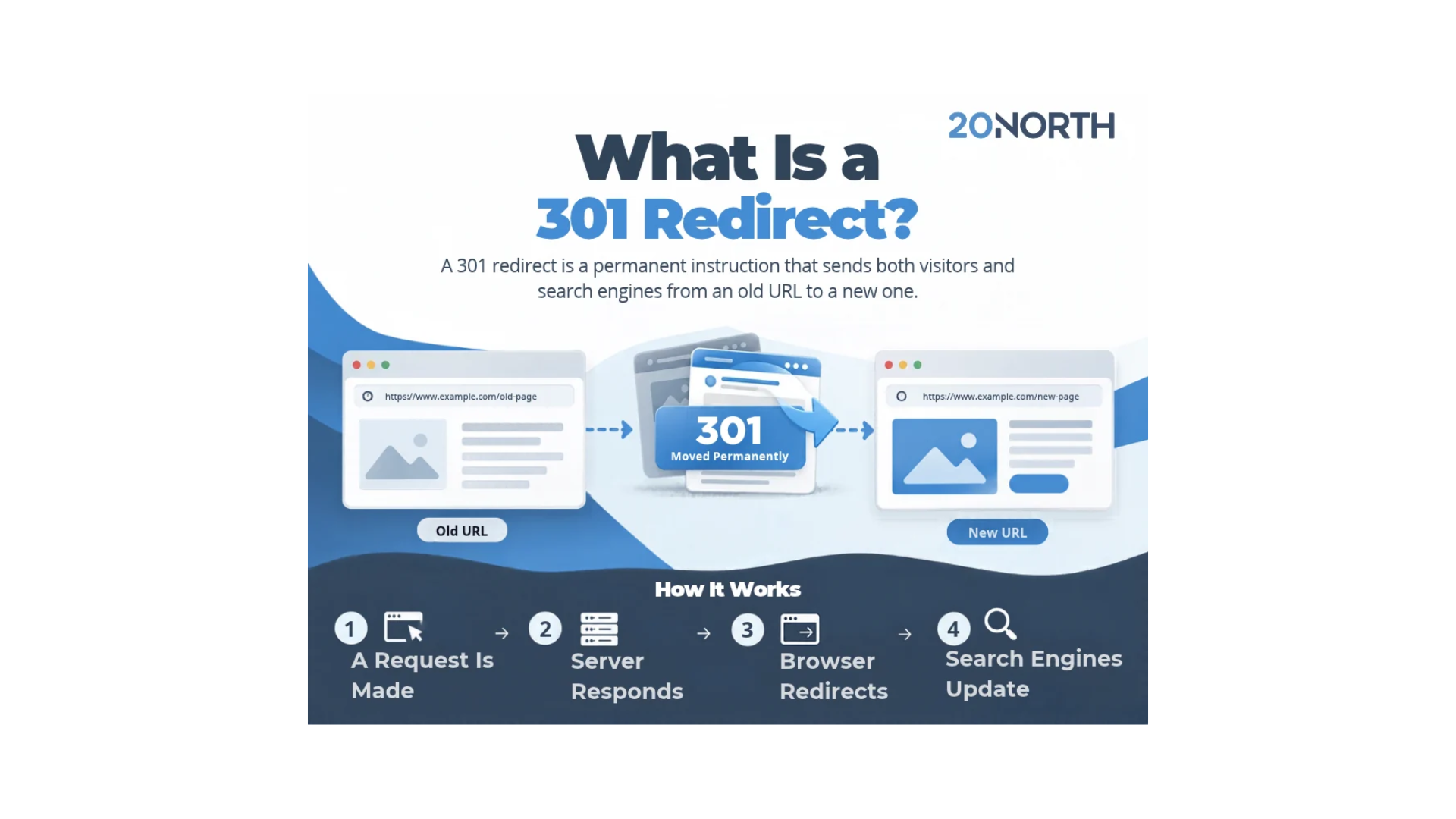
The Short Answer: A 301 redirect is a permanent instruction that sends both visitors and search engines from an old URL to a new one. When a web server returns a 301 status code, it tells a web browser and a search engine that the page has moved for good, so the new page becomes the final destination and most of the old page’s link equity carries over.
A 301 redirect is one of the most useful tools in technical SEO, and it solves problems that would otherwise cost you traffic. Change a URL, move to a new domain, or retire an old page, and anyone who clicks an old link lands on a dead end unless a redirect sends them to the right place. Setting one up correctly takes a few minutes, and getting the status code wrong can cost you rankings for months.
What Is a 301 Redirect?
A 301 redirect is a server side response that permanently moves a web page from its original URL to a new URL. The number 301 is an HTTP status code, part of the standard HTTP response a web server sends to a browser. When the code is 301, the message is that the page has moved permanently and the new location is the one to use from now on.
That permanence is what separates it from other redirect types. According to Google’s documentation on redirects, a permanent redirect tells the search engine that the redirect target should become the canonical URL, the version shown in the search result. A temporary redirect keeps the old page in search results instead. So the status code you choose directly shapes which page a search engine indexes and ranks.
How a 301 Redirect Works
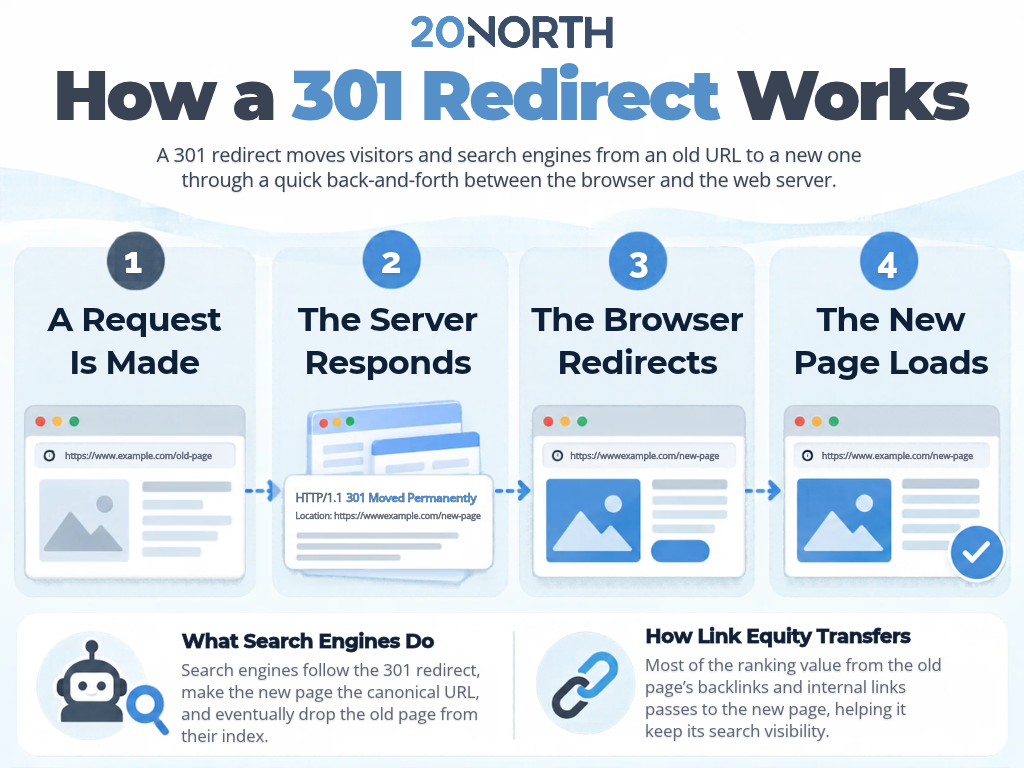
A 301 redirect runs through a quick exchange between the browser and the web server, and it happens in a fraction of a second.
The HTTP Request and Response
When someone clicks an old link or types an old URL, the web browser sends an HTTP request to the server. If a redirect rule is set up for that old page, the server answers with an HTTP response carrying the 301 status code and the address of the new page. The browser reads that response and automatically loads the redirect target. The visitor often never notices the extra step.
What Search Engines Do With It
A search engine treats the 301 as a strong signal. Googlebot follows the redirect, then uses it to decide that the new page should be the canonical URL. Over time, the search engine drops the old page from its index and ranks the new page in its place. This is how a redirect protects your search rankings during a change, because the authority tied to the original page moves to the correct page rather than disappearing.
How Link Equity Transfers
Link equity is the ranking value built up from internal links and backlinks pointing at a page. Google’s site move documentation says permanent redirects do not cause a loss in PageRank, so the ranking value built up on the old URL carries over to the new location. That matters because a page that earned authority over years should not lose it just because its URL changed. Keeping internal links updated to point at the final destination also helps, since it reduces the work the server and search engine have to do.
Pro Tip: After you set up a redirect, test the old URL in your browser’s developer tools and confirm the server returns a 301, not a 302. A wrong status code is one of the most common redirect issues, and it tells the search engine to keep the old page instead of the new one.
Different Types of Redirects
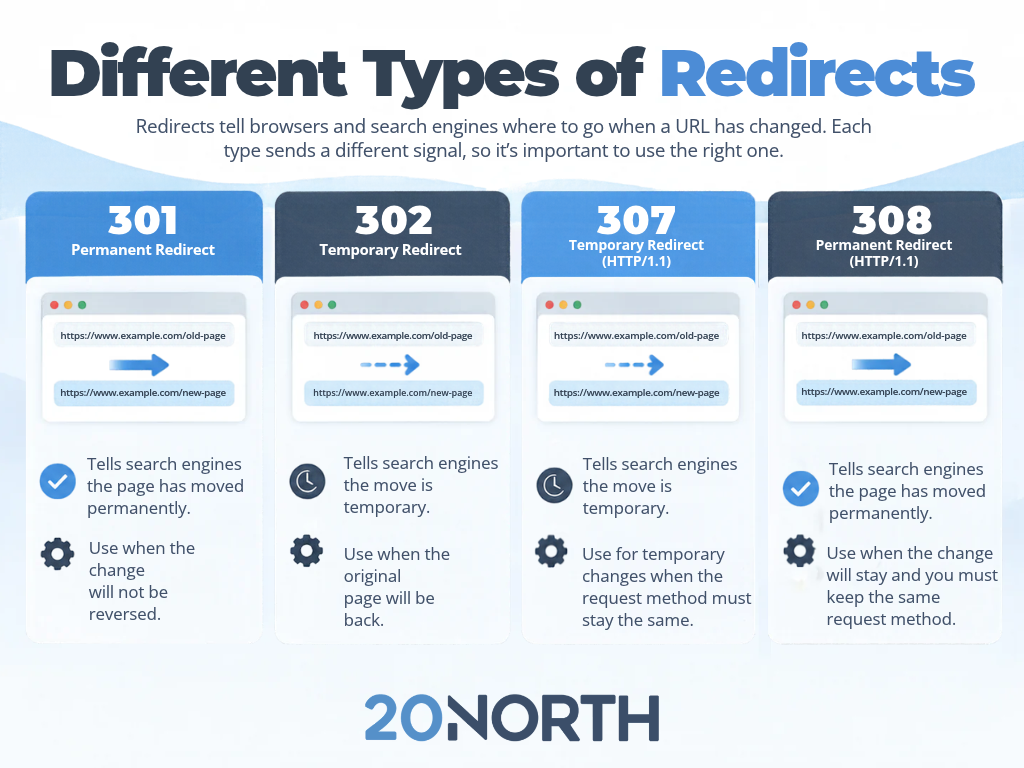
The 301 is one redirect type among several, and knowing the difference helps you avoid sending the wrong signal to a search engine. Google’s guidance groups them by how long the change will last.
Permanent Redirects (301 and 308)
Both the 301 and the 308 status code mean a page has moved permanently. These pass the canonical signal to the new page, which makes them the right choice when you are confident the move will not be reverted. The 301 is the one most people know, and it is the standard for a permanent move.
Temporary Redirects (302 and 307)
A 302 or 307 tells a search engine the move is temporary. Googlebot still follows the redirect, but it keeps the original page in the search result. Use a temporary redirect only when the old URL is coming back, such as a product page that is briefly offline.
Meta Refresh and JavaScript Redirects
A meta refresh set to zero seconds and a JavaScript location redirect can also move a visitor, and Google can read both. They are less reliable than a server side redirect, though. Google recommends reaching for these only when a server side option is not available, because a rendering failure can mean the search engine never sees the redirect at all.
When to Use a 301 Redirect
A permanent redirect earns its place in a handful of common situations. Each one involves an old link that would otherwise break.
These are the most common situations:
- Site migration: when you launch a new site or restructure your URLs, 301s map every old page to its match on the new site.
- Domain migration: moving to a new domain means pointing every old URL on the old domain to its counterpart, so you keep your rankings on the new domain name.
- A changed URL: update a slug or move a page into a new folder, and a redirect keeps the old link working.
- A removed page: delete a page and send its traffic to the closest relevant page rather than a 404 error.
- Consolidating duplicates: when the same content sits at more than one URL, a redirect points the extras at your preferred canonical URL.
Mapping these moves carefully is a core part of any technical SEO project, and it is one of the first things our team checks during a site migration.
Setting Up and Maintaining 301 Redirects
How you create a redirect depends on your server and platform, but the goal is always a clean path from the old page to the new page.
Server-Side Setup
On an Apache server, you add a redirect rule to the .htaccess file. On NGINX, you write a return rule in the server configuration. Many content platforms also offer a built-in redirect manager, so you may not need to touch server files at all. A server side redirect is the most reliable option, since Google reads it most consistently.
Keep Redirects Clean
Two problems show up most often. A redirect chain happens when an old link points to a second URL that points to a third, forcing extra hops before the browser reaches the final destination. A redirect loop happens when two pages point at each other and the page never loads. Both can hurt the user experience and waste crawl budget, so map each old URL straight to its final page.
Verify and Monitor
After launch, check your redirects in Google Search Console and crawl the site to confirm each old page returns a single 301 to a live page. Keep permanent redirects in place long term, since the search engine and your returning visitors both rely on them. A page with an SSL certificate should also redirect its old HTTP version to the secure HTTPS address, which is one more permanent redirect worth confirming.
Get Your Redirects Right the First Time
A 301 redirect is a small piece of code with a large effect on your search rankings. Used correctly, it moves visitors and search engines to the right place, transfers your hard-earned link equity, and keeps the user experience smooth through a site migration or domain migration. Used carelessly, it creates redirect chains, redirect loops, and lost rankings that take months to recover.
At 20North, our team handles redirect mapping, technical SEO, and web development so your next site change protects the traffic you already have. We are a full-service digital marketing agency in Atlanta that helps growing businesses earn more qualified traffic across every channel. Our team pairs SEO with paid media, email marketing, and web development to turn technical work like redirects into real growth. See our SEO services or reach out to our team for a free audit of your site’s redirects and overall search health.