
.png)
The Short Answer: An llms.txt file is a markdown file placed in your website's root directory that gives large language models a clean, organized map of your most important content. It is a proposed standard from Jeremy Howard at Answer.AI, designed to help AI systems like ChatGPT, Claude, and Perplexity navigate your site without parsing complex HTML.
An llms.txt file lets you tell AI assistants exactly which pages on your site matter most, in a format any language model can read in seconds. This guide explains what llms.txt is, how it works, who is using it in 2026, and whether you should add one to your own website.
What is an LLMS.txt File?
An llms.txt file is a single text file written in markdown format, placed at the root of your domain (https://example.com/llms.txt). It contains a structured summary of your site's most important content, written so large language models can parse it easily.
The file was proposed by Jeremy Howard, co-founder of Answer.AI, in September 2024. The official specification lives at llmstxt.org. The format borrows from how robots.txt and XML sitemaps work, but it is built for AI models rather than search engines.
A simple llms.txt file looks like this:
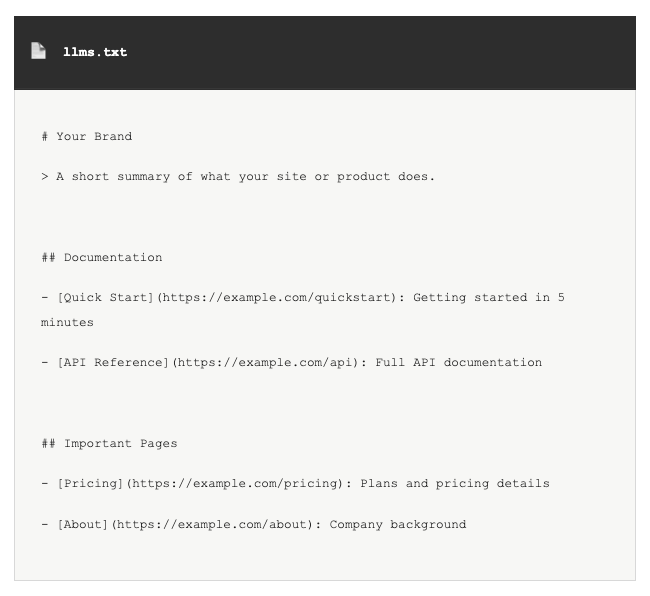
Why LLMS.txt Exists
AI models have a problem reading websites. They have small context windows compared to the size of most sites, and standard web pages are full of HTML, ads, navigation menus, and scripts that make extraction messy. By the time an AI tool parses through all of that, it may run out of room for the actual content.
An llms.txt file solves this by giving AI systems a cleaner signal. Instead of crawling your entire site, an AI agent can read a single file that tells it what matters and where to find it. The file format works well for documentation sites, software libraries, and any business that wants AI assistants to give accurate answers about its products.
LLMS.txt vs Other Files
Three text files commonly live in your root directory, each built for different purposes:
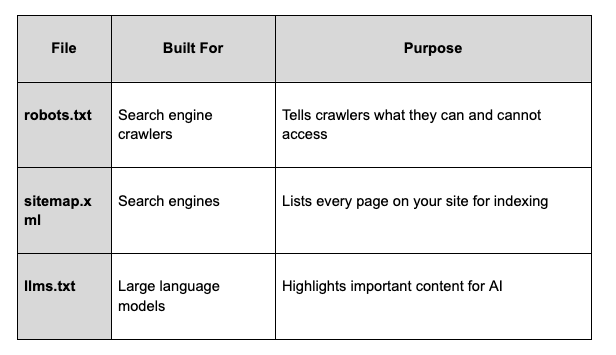
llms.txt does not replace robots.txt or sitemap.xml. The three coexist. robots.txt and sitemap.xml continue to do their jobs for traditional search results, while llms.txt adds editorial curation for AI tools.
There is also a companion file called llms-full.txt that holds a complete markdown version of your documentation in a single file. Some sites publish both, with llms.txt being the curated summary and llms-full.txt being the full text.
Inside an LLMS.txt File
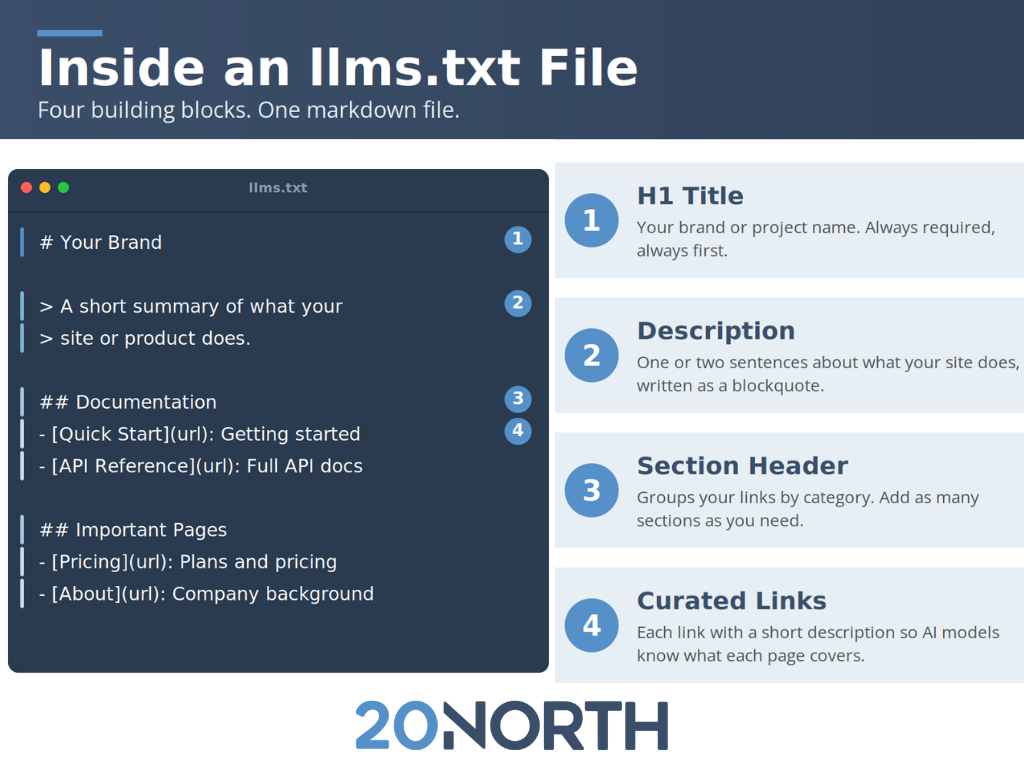
A well-formed llms.txt file follows a consistent structure:
- H1 title with your brand or project name
- Blockquote summary with one or two sentences about what you do
- Markdown sections that group links by category (e.g., Documentation, Important Pages, Optional Resources)
- Bullet lists with each link followed by a short description
The whole file should read as plain text with no HTML, no images, and no styling. Just markdown that an AI model can parse cleanly.
Who is Using LLMS.txt in 2026?
Adoption has grown steadily since the proposal launched. As of 2026, an llms.txt file is published by:
- Developer-focused companies like Anthropic, Stripe, Cursor, Cloudflare, Vercel, Mintlify, Supabase, and LangGraph
- About 10% of websites overall, with adoption highest among SaaS, publishing, and tech sectors
- WordPress sites running Yoast SEO, which now generates llms.txt automatically
No major LLM provider, including OpenAI, Anthropic, Google, and Meta, has officially committed to reading the file in production. GPTBot fetches llms.txt files occasionally, but there is no public confirmation that it influences how content shows up in AI search results. The IDE agent space (Claude Code, Cursor, Continue) does use llms.txt today to load context about a project.
Should You Add an LLMS.txt File?
Yes, with realistic expectations.
The honest case for adding llms.txt
- Cost is near zero. A basic file takes a few hours to write and ship.
- Developer tools use it. If your users include developers or technical buyers using AI-assisted IDEs, an llms.txt makes those tools work better with your content.
- It is free insurance. If or when major LLM providers commit to reading the file, being early costs nothing and may pay off later.
- It forces clean documentation. The act of writing an llms.txt requires you to inventory your most important pages. That is useful work even if no AI tool ever reads the file.
The honest case against expecting too much
- No measurable lift in AI citations yet. Independent testing has not shown llms.txt files improving how often AI tools cite your brand.
- No formal standard. llms.txt is a community convention, not a W3C or IETF standard.
- It is not an SEO tool. It does not affect Google rankings.
Treat llms.txt as one piece of an AI visibility strategy, not the whole strategy.
How to Create an LLMS.txt File
The full process takes a few hours for most sites and follows a few best practice steps:
- Identify your most important pages. Documentation, pricing, about, top blog posts, and product pages.
- Write a short summary of what your site does in one or two sentences.
- Group the links into sections by purpose (e.g., Documentation, Product, Company).
- Add a one-line description after each link so AI models know what each page covers.
- Save the file as llms.txt and upload it to your root directory.
- Verify the file loads at yoursite.com/llms.txt.
For larger sites with extensive docs, you can also publish llms-full.txt with markdown versions of your full documentation site.
Common Mistakes to Avoid
A few patterns weaken an llms.txt file:
- Listing every web page. Curate. The file is meant to highlight what matters, not duplicate your sitemap.
- Skipping descriptions. A link without context is harder for AI models to use.
- Contradicting robots.txt. If a page is blocked in robots.txt but linked in llms.txt, AI tools get mixed signals.
- Using marketing fluff. Plain, direct sentences perform better than promotional copy.
- Never updating it. As your site changes, the file needs to change with it.
Putting LLMS.txt to Work for Your Site
llms.txt is one of the simplest AI optimization steps you can take in 2026. The standard is still proving itself, but the cost to implement is low and the upside is real. If your audience includes developers using Claude Code or Cursor, the benefit is immediate. If you serve a broader user base, an llms.txt file is extra preparation for the day when more AI companies commit to reading it.
20North builds llms.txt files for clients across e-commerce, SaaS, and service industries as part of our broader AI SEO strategy. We pair llms.txt with schema markup for AI search, content optimization, and AI visibility tracking so your brand shows up wherever your customers search. To get help building or auditing your own llms.txt file, learn more about our AI SEO services or contact 20North to get started.
.png)
.png)
.png)