
Why am I seeing GCLIDs, GBRAIDs and WBRAIDs in my Google Analytics?
.png)
The Short Answer: Those long strings are Google Ads click identifiers. Google attaches one to your landing page URL every time someone clicks an ad and auto-tagging is on. GCLID is the original. GBRAID and WBRAID arrived after Apple's iOS 14.5 privacy changes, and they stand for a group of users rather than one person. You can hide them from your Google Analytics reports, though hiding the wrong one will break your Google Ads attribution.
What You Are Actually Looking At
Weird URL strings in your Google Analytics landing page data look something like this:
yoursite.com/spring-sale?gclid=Cj0KCQiA1NacBhCoARIsAHf1
That is a Google Click Identifier. When a website visitor clicks your ad, Google Ads attaches the parameter to the destination URL, and it carries the campaign, ad group, keyword, match type, device, and timestamp back to Google. Most Google and Meta advertisers know these IDs power smart bidding once they are captured and sent back to the ad platform.
Then iOS 14.5 shipped, and some of those GCLIDs started arriving as something else.
Why GBRAID and WBRAID Exist
Apple's App Tracking Transparency framework requires apps to ask permission before tracking a user across other apps and websites. When someone declines, Google cannot tie the click to one individual, so the GCLID is unavailable.
Google built two replacement parameters that stand for a cohort instead of a person. Several users share the same value. That protects individual identity while still letting Google measure campaign performance in aggregate.
The Difference Between GBRAID and WBRAID
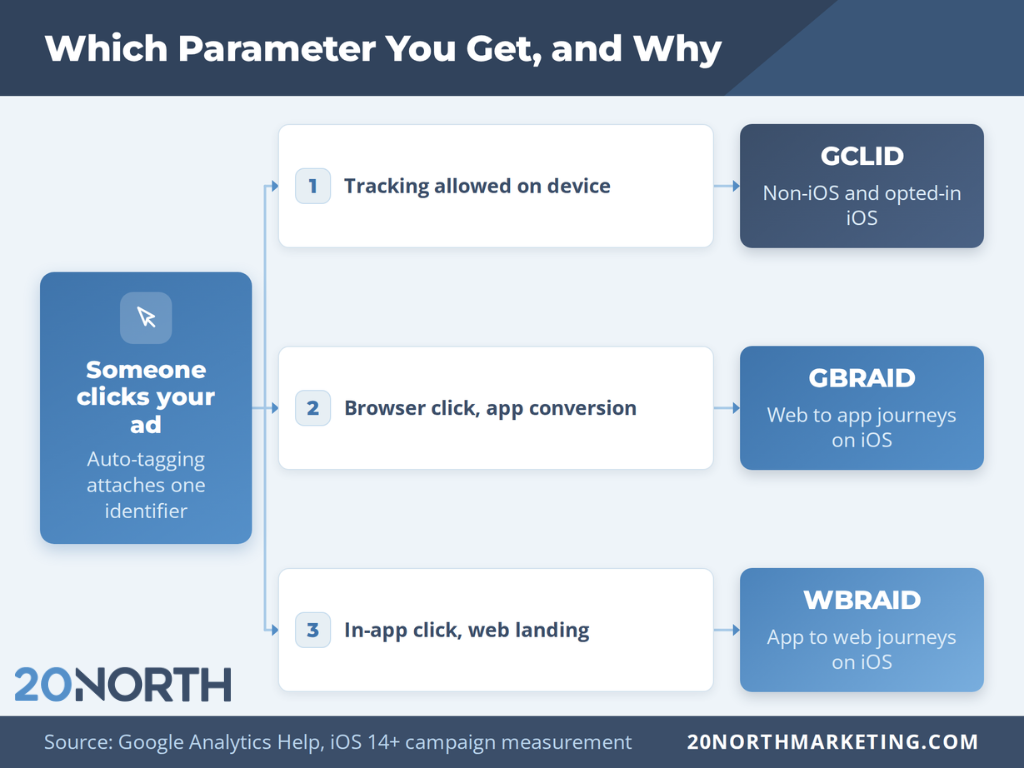
Sources across the web disagree on this, so here it is from Google. Google Analytics Help states that for web to app measurement the parameter is GBRAID, and for app to web measurement it is WBRAID.
- GBRAID covers web to app. Someone clicks your ad in a browser and converts inside your app.
- WBRAID covers app to web. Someone clicks your ad inside an app like YouTube or Gmail and lands on your website.
Only one appears on any given URL, and which one you see depends on where the click started. If you run YouTube video campaigns or Discovery ads, expect more WBRAID. If you drive app installs, expect more GBRAID.
Is GCLID Going Away?
No. GCLID still serves as the event identifier on every surface Apple's rules do not touch, which covers Android, desktop browsers, and iOS users who allowed tracking. GBRAID and WBRAID only appear when the GCLID is unavailable.
Search is also unaffected. The replacement parameters show up on traffic from a handful of Google apps on iOS, so most accounts still see GCLID on the majority of their website traffic.
Make Sure Your Site Accepts the Parameters
Most advertisers need to do nothing. A small percentage need to allow arbitrary URL parameters so the value survives the trip to the landing page, and Google documents that process.
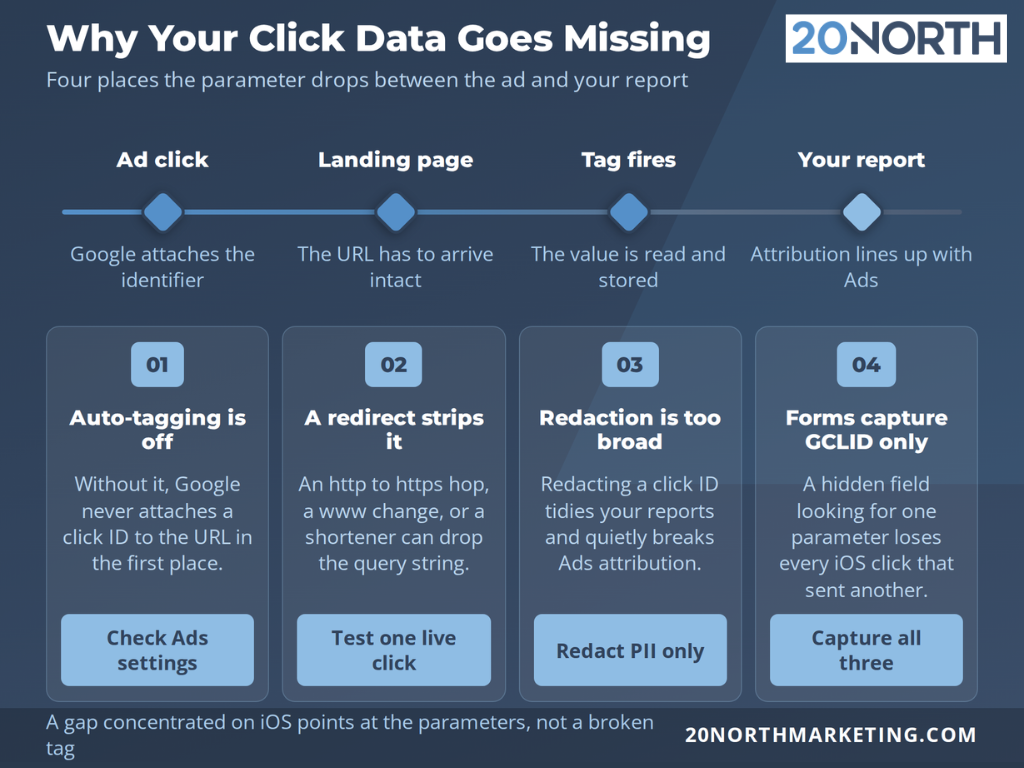
Two setup items matter more than the rest. Use the Google tag or Google Tag Manager rather than hand-rolled tracking code, since both were updated to handle the new parameters. Then check that nothing strips the query string between the ad click and the page load. Redirect chains are the usual culprit. An http to https hop, a non-www to www redirect, or a URL shortener can drop the parameter before your Google Analytics property ever sees it, and the click arrives looking like direct traffic. Our web development team runs into this most often after a site migration.
Can I Remove These From Google Analytics?
Yes, and the method changed. The old advice was written for Google Universal Analytics, which let you strip query parameters at the view level. Universal Analytics stopped collecting data in 2023, so those steps no longer apply.
In a Google Analytics 4 property, the setting is called data redaction. Google's documentation covers the full process:
- Open Admin, then Data collection and modification, then Data streams.
- Click your web data stream.
- In the Events section, click Redact data.
- Turn on the switch for URL query parameters.
- Enter the parameters you want removed, separated by commas.
A few limits are worth knowing before you turn it on. Data redaction runs client-side in the browser, so it only affects data collected after you switch it on and will not clean up historical reports. It applies to a defined set of event parameters including page_location, page_referrer, and page_path. You can list up to 30 parameters, and you need Editor access on the Google Analytics account.
Capture the ID Before You Hide It
Hiding a parameter from your reports and capturing it for measurement are separate jobs, and the second one pays for itself.
If you run lead generation, store whichever click ID is present as a hidden field on your forms and pass it into your CRM alongside the lead. When that lead closes weeks later, you can upload the conversion back to Google Ads against the original click. That is how offline revenue teaches smart bidding what a good lead looks like, and it works with GBRAID and WBRAID the same way it works with GCLID.
The catch is that your form has to grab all three. A setup that only looks for GCLID silently drops every iOS click that arrived with one of the other two, and the leads it loses tend to be the mobile ones.
Think Twice Before Redacting GCLID
Redacting a Google Ads click ID can quietly break the Google Ads integration that depends on it. Your reports get tidier and your attribution gets worse, which is a bad trade for cleaner-looking custom reports.
If the goal is readable landing page reports, redact the parameters that carry no measurement value first. Session identifiers, internal search strings, and anything holding personal information belong on that list well before a click ID does. Reporting in Looker Studio, formerly Data Studio, gives you another option, since you can group landing pages by path there and leave the underlying data collection alone.
Where Consent Mode Fits
Click IDs are one piece of a larger shift in how Google handles user preferences. Consent mode passes a visitor's choices about analytics storage and ads personalization to Google's tags, and Google models the gap left by users who decline. For businesses reaching the European Union, consent mode is now the mechanism that keeps measurement running under a valid legal basis.
Google Signals is the related setting most accounts forget. It powers demographic and cross-device behavioral reporting, and it also suppresses data in reports when thresholds are not met. If your Google Analytics data shows fewer users than you expect on small segments, check that setting before you assume something is broken.
None of this requires new tools. It requires knowing which privacy controls are on in your Google Analytics account and what each one does to your daily data.
Checking Your Setup Without Guessing
Google Tag Manager preview mode and the real time reports in Google Analytics answer most tracking questions in about ten minutes.
Load your landing page with a test parameter appended to the URL, then watch what the page_location value looks like when the tag fires. If the parameter is there before the tag fires and gone afterward, something on the page is rewriting the URL. If it never arrives at all, the problem sits upstream in a redirect. Confirm you are looking at the right Google Analytics property while you are in there, since the measurement ID in the container is an easy thing to get wrong after a site migration.
When the Numbers Still Do Not Match
Google Ads and Google Analytics rarely agree perfectly, and click IDs explain part of the gap. Google Analytics reports impacted iOS traffic using modeled conversions rather than a one-to-one match with individual clicks, so exact reconciliation is not the goal.
Before assuming a tracking problem, check these four things. Confirm auto-tagging is on in Google Ads. Test a live ad click and watch what reaches the landing page. Compare the same date range and time zone in both platforms. Then segment by device, because a gap concentrated on iOS points at the parameters in this post rather than a broken tag.
Getting Your Google Ads Tracking Right With 20North
Click IDs are plumbing. They only matter because the reporting built on top of them drives budget decisions, and a paid media program working from bad attribution spends real money in the wrong places.
20North builds and audits this tracking as part of our paid media and analytics work. Our team pairs Google Ads management with search engine optimization, conversion rate optimization, and web development so the data flow between your ads, your site, and your reports stays intact. See it in our case studies, including how Spartan Camera doubled ad spend and drove more than a million dollars in Meta-attributed sales.
Contact 20North for a free audit of your Google Ads and Google Analytics setup!
.png)
.png)
.png)