
.png)
The Short Answer: Tracking AI traffic means separating visits from AI tools like ChatGPT, Perplexity, Gemini, Claude, and Copilot from the rest of your website traffic. The most reliable tracking method in Google Analytics is a custom channel group. You give Google Analytics a list of the AI sites you want to watch, tell it to check that list before it files a visit anywhere else, and those visits then show up on a line of their own in your reports.
More shoppers and buyers are starting their research process inside an AI chatbot instead of a search engine. When an AI assistant cites your page and someone clicks the link, that visit reaches your site with its own source data. Google Analytics files most of those sessions under referral traffic by default, while some end up in direct traffic, so the channel is easy to overlook. This guide explains where AI-driven traffic shows up, how to give it a dedicated channel, and how to use the data to shape your content strategy.
Why Tracking AI Traffic Matters
AI-generated traffic is growing quickly, and it tends to perform well. Adobe reported that traffic from AI sources to U.S. retail sites grew 393% year over year in the first quarter of 2026. The same report found that AI traffic converted 42% better than non-AI traffic in March 2026, and those visitors had a 12% higher engagement rate.
A channel growing at that pace deserves its own line in your reporting. When they stay buried in a general referral bucket, you cannot tell which pages AI systems cite, which AI platform sends buyers, or how the traffic compares with organic search and paid campaigns. Separate reporting also shows how your AI visibility work is paying off, the same way rankings and clicks show progress in traditional search.
Where AI Traffic Shows Up in Your Analytics
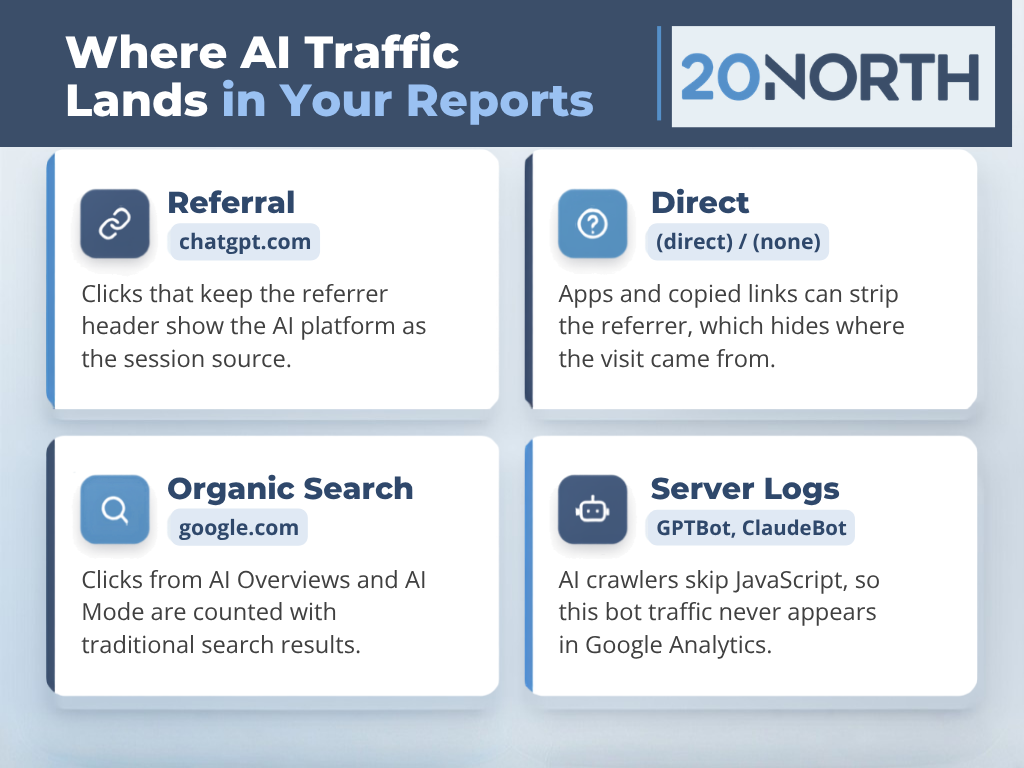
When a person clicks a cited link inside an AI chatbot, the browser usually passes a referrer header. That header tells analytics platforms which site sent the visit. Google Analytics reads it and records a session source such as chatgpt.com or perplexity.ai. Google Analytics then sorts every session into a channel using a fixed set of rules it ships with. The default channel group has no AI channel, so these sessions land in the Referral channel next to every other site that links to you.
Some AI-driven visits lose the referrer header along the way, which is the only thing telling Google Analytics the visit came from an AI tool. Desktop and mobile apps, copied links, and certain privacy settings can strip the referrer header. That sends the session to direct traffic with no record of where it came from. ChatGPT commonly adds “utm_source=chatgpt.com” to the links it shares, and those UTM parameters let Google Analytics credit the visit even when the referrer is missing.
Clicks from a Google AI Overview or AI Mode follow a different path. They come from google.com, so Google Analytics counts them as organic search alongside traditional search results. Google Search Console includes them in its overall web performance data instead of a separate report. Knowing how Search Console and Google Analytics differ helps you read both reports correctly.
An AI bot reads your pages without running the JavaScript that Google Analytics depends on, so this bot traffic never appears in your reports. Your server logs or CDN bot reports are the place to see which AI systems crawl your site. An llms.txt file can also help guide how those crawlers read your content.
How to Track AI Traffic in Google Analytics
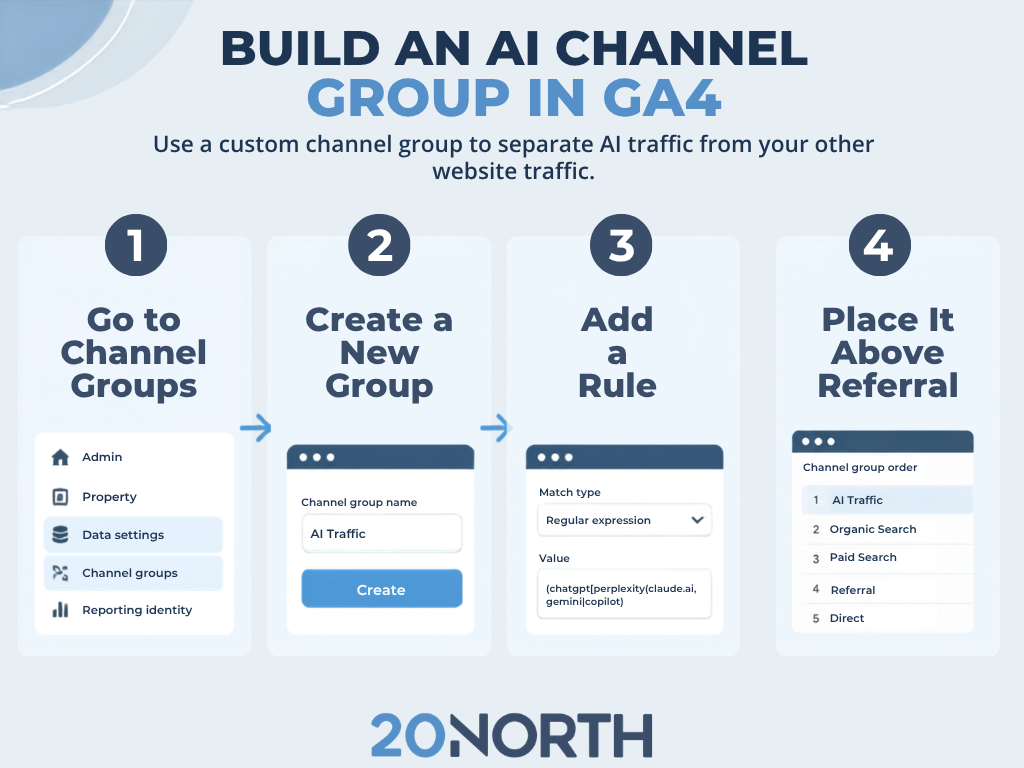
A custom channel group is the cleanest way to track AI traffic in GA4. Google's help documentation on custom channel groups includes an AI assistants example, and the setup takes a few minutes.
Here is how to set one up:
- Open Admin in your GA4 property, go to Data display, and select Channel groups.
- Open the Default Channel Group and select Copy to create new so your standard channels carry over into the new channel group.
- Name the group something clear, such as "Channels with AI," and click Add new channel.
- Name the new channel "AI Assistants," set the dimension to Source, and choose "matches regex" as the match type.
- Paste a regular expression that covers the AI tools you want to track.
- Save the channel, drag AI Assistants above Referral in the channel list, and save the group.
Channel order matters in this setup. Google Analytics assigns each session to the first channel whose rules it matches, so an AI channel placed below Referral will never collect data. Custom channel groups also apply to historical data, which means you can review past AI referrals as soon as the group is saved.
To view the results, open the Traffic acquisition report and switch the primary dimension to your new channel group. Add session source as a secondary dimension to break AI Assistants down by platform. For deeper analysis, build a custom segment in Explorations where session source matches your rege, and then compare that segment against organic search and paid traffic.
You should also review your Referral channel once a month for new AI domains. New AI tools launch often, and any source missing from your regular expression slips back into referral traffic until you add it.
Tracking AI Traffic in Other Analytics Platforms
Google Analytics is the most common starting point, but other tools can track AI traffic with the same logic.
Adobe Analytics
Create a marketing channel processing rule that matches the referring domains of AI platforms, and place it above your general referring domains rule. A segment built on the same domains works well for one-off analysis.
Looker Studio
Connect your GA4 property and add a calculated field that uses CASE WHEN with REGEXP_MATCH on session source to label AI visits. The field lets you build custom reports and dashboards that show AI referrals next to every other channel.
Server logs and CDN tools
These sources show AI crawlers and AI agent activity that tag-based analytics cannot capture. They help you confirm that AI systems can reach your most valuable pages, which ties into your technical SEO.
Tracking Agentic Commerce on Shopify
Some AI activity never arrives as a normal browsing session. Shopify now feeds product data to ChatGPT, Microsoft Copilot, and Google AI Mode through Shopify Catalog and Agentic Storefronts, so an AI agent can surface your products and send the shopper straight to checkout. Shopify reported that AI-driven traffic to its stores grew eight times year over year in the first quarter of 2026, with orders from AI-powered searches up nearly 13 times.
Shopify merchants should check two places. Your GA4 channel group covers the clicks that land on the storefront, and the order channel labels in your Shopify admin show sales that came through AI channels. Pair both with clean product data, since agents rely on accurate titles, pricing, and inventory to recommend a product at all. The Shopify Knowledge Base app is a useful companion here, and Shopify SEO work keeps that product information accurate.
What to Measure Once AI Traffic Has Its Own Channel
A new channel earns its place when the data gives you more insight to build strategy on.
Focus your reporting on these metrics:
- Sessions by AI platform: This view shows which AI tools send the most visits and how that mix changes month to month.
- Engagement rate: Compare AI referrals with organic search and paid media to see how well each group connects with your content.
- Key events and revenue: Conversion tracking shows if AI-driven visits turn into leads, purchases, or booked calls.
- Top landing pages: The landing page report for your AI channel reveals which content AI tools cite most often.
- Trends over time: Historical data helps you spot growth and connect it to content updates or technical changes.
These numbers should feed directly into your content strategy. Pages that already earn AI referrals are strong candidates for expansion and internal links. Pages that attract AI-driven visits but show weak engagement may need a clearer landing page experience or stronger calls to action through conversion rate optimization. You can add these metrics to the SEO KPIs you already report on. Stakeholders then get a complete view of search performance across traditional search and AI search.
Build a Measurement Plan with 20North for AI Search
Artificial intelligence is changing how people discover brands, and your analytics should reflect that shift. Tracking AI traffic starts with a new channel group, an up-to-date list of the AI sites you want to catch, and a habit of checking where referral and direct traffic come from. After that, engagement, conversion, and landing page data show which pages AI systems trust and where your site needs work.
At 20North, our SEO and AEO teams help brands measure and grow AI referrals as part of a connected digital marketing strategy. We are a full-service agency based in Atlanta, and we work with growing brands that want their reporting to keep up with how people actually search. Our team handles the tracking setup, the monthly reporting, and the content and technical SEO work that earns more AI citations.
Explore our AI visibility services or contact our team for an AI SEO audit of your site.
.png)
.png)
.png)